🖼️ ComfyUI
- 🖼️ Fix Black Image / Video Output in ComfyUI When Using SageAttention
- 🖼️ Compare AI image results. (GPT, Gemini, ZIT, QwenImage, FLUX)
- 🖼️ Hunyuan 3D model generation
- 🖼️ Nunchaku / SVDQuants
- 🖼️ HunyuanVideo
- 🖼️ LTX2.3 Video Generation using ComfyUI
🖼️ Fix Black Image / Video Output in ComfyUI When Using SageAttention
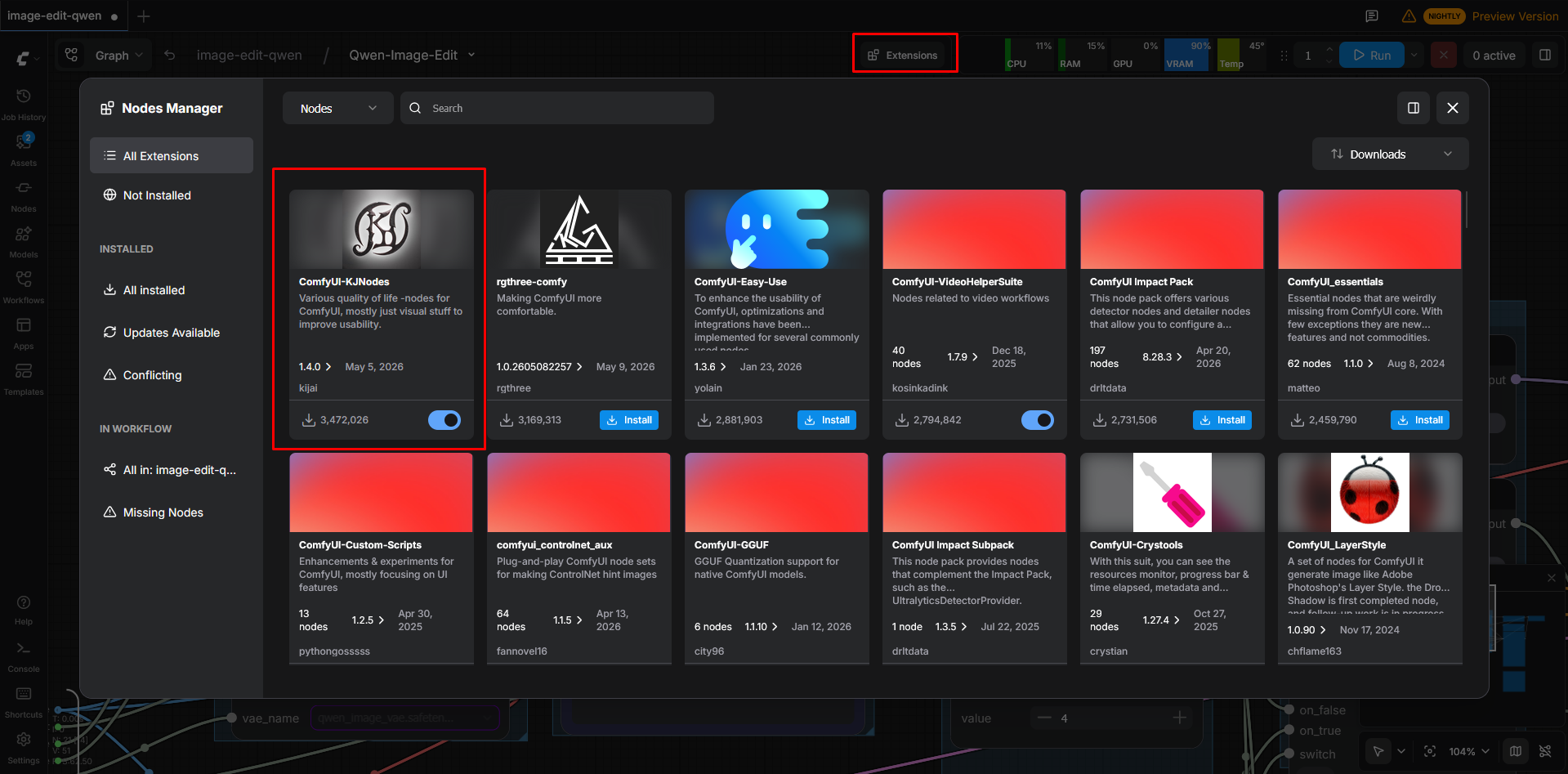
1. Install ComfyUI-KJNodes
- Open Extensions in ComfyUI.
- Search for
ComfyUI-KJNodes. - Install the package.
- Restart ComfyUI after installation if required.
2. Patch SageAttention Correctly
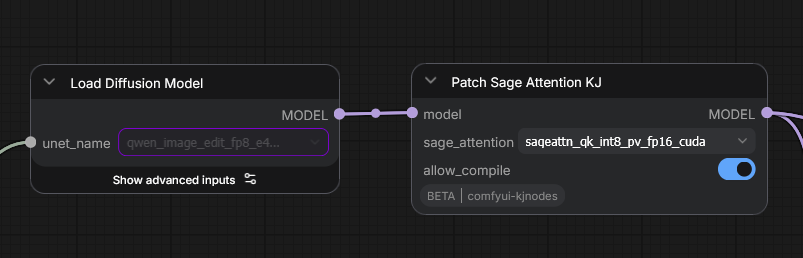
After loading your model and LoRAs, you must add the node:
Patch Sage Attention KJ
Then select one of the following modes:
sageattn_qk_int8_pv_fp16_tritonsageattn_qk_int8_pv_fp16_cuda
Important Notes
- The patch node should be applied after loading the checkpoint/model and LoRAs.
- Using the wrong SageAttention backend may result in completely black outputs.
- If one backend does not work on your system, try the other option.
Recommended Order
Load Checkpoint
↓
Load LoRA(s)
↓
Patch Sage Attention KJ
↓
Sampler / Generation Nodes
This issue is commonly related to unsupported or unstable SageAttention kernel configurations on certain GPU, CUDA, or PyTorch combinations.
Useful Links
🖼️ Compare AI image results. (GPT, Gemini, ZIT, QwenImage, FLUX)
Prompt
Create a Hatsune Miku concert poster in a 3D anime style, with a similar Frutiger Aero theme,
featuring a prominent title and specific content in English.
Result
| ChatGPT | Gemini (Nano Banana) | ZIT (Lightx2v) | QwenImage Turbo | QwenImage | FLUX-2 |
|---|---|---|---|---|---|
 |
 |
 |
 |
 |
 |
Conclusion
ChatGPT and Gemini demonstrate superior performance in image generation. Conversely, localized models like ZIT, Qwen, and Flux often produce text rendering errors in moderately complex scenarios, a limitation stemming from their reduced parameter size and the loss of accuracy induced by quantization.
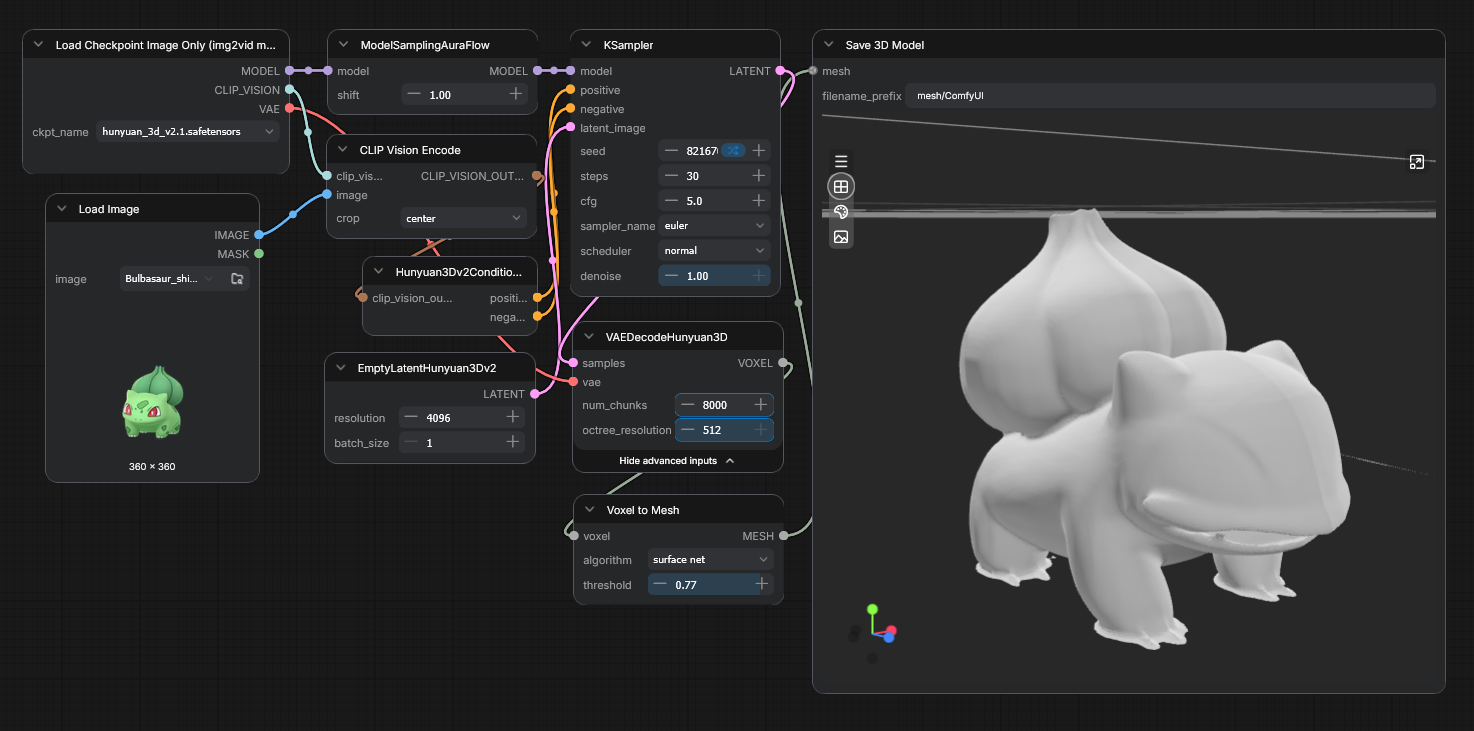
🖼️ Hunyuan 3D model generation
Superfast model generation from image.
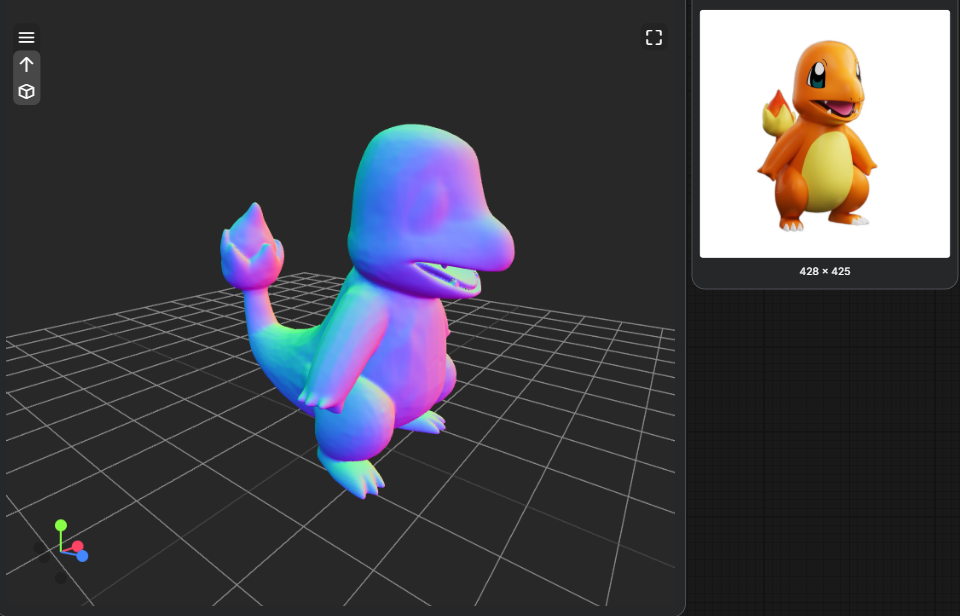
Mesh optimization.
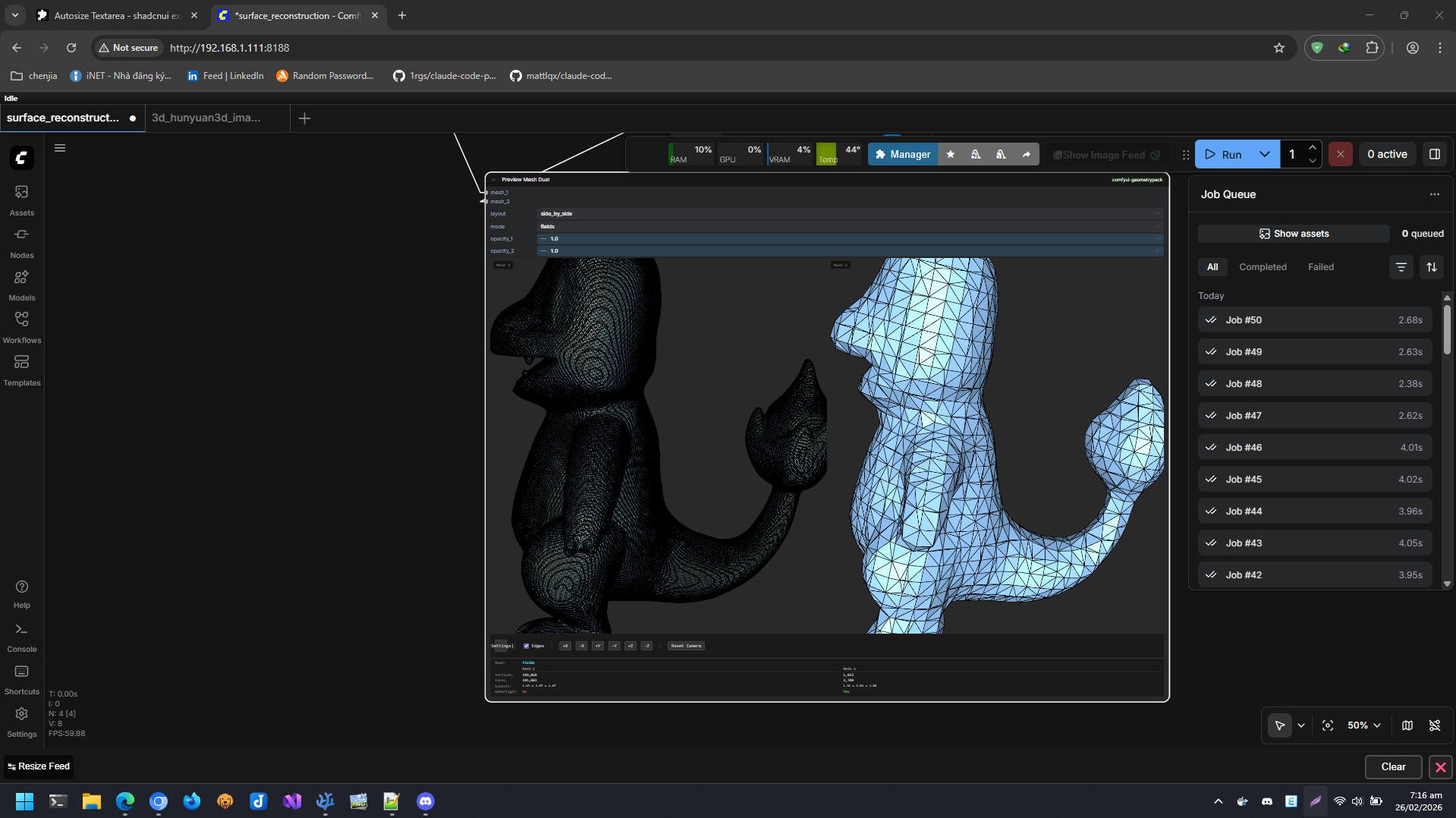
Tunning
- [VAEDecodeHunyuan3D] -> octree_resolution = 512
- [Voxel to Mesh] -> threshold = 0.77
🖼️ Nunchaku / SVDQuants
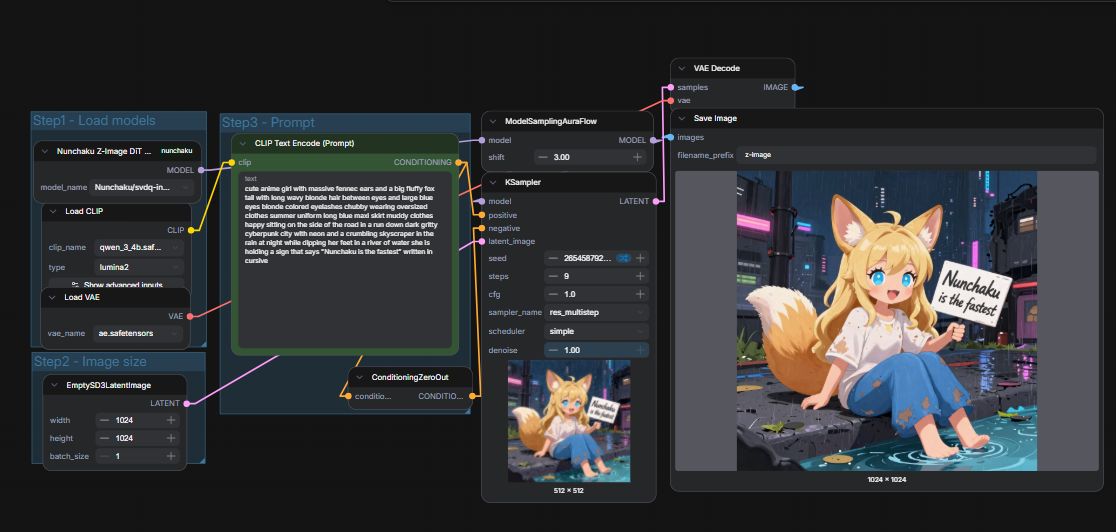
Deep Analysis: Why Optimized INT4 Formats Outperform Q4 (GGUF) Formats in ComfyUI
When running large diffusion models like FLUX.1 or SD3/3.5 in ComfyUI, VRAM optimization is critical. While both Q4 and various INT4 formats fall under the "4-bit quantization" umbrella, they are fundamentally different.
The architectural superiority of optimized INT4 formats does not stem from compressing the file to a smaller size, but rather from superior data layout arrangement and the ability to execute calculations directly on GPU hardware without converting back to FP16.
This document breaks down the low-level technical reasons why INT4 delivers faster inference speeds and significantly better prompt adherence/detail preservation compared to Q4.
1. Superior Data Layout & Coalesced Memory Alignment
The way data is structured and arranged in VRAM dictates how efficiently the GPU can retrieve it. Even at the same bit-width, layout mismatch can severely bottleneck performance.
The Fragmented Approach of Q4 (Block-wise)
- Structure: Format families like Q4 (commonly found in GGUF or standard block-wise quantization) arrange data in fixed blocks (typically 32 or 64 weights per block). Each block contains a shared FP16 scaling factor (scale) followed by the 4-bit quantized weights.
- The Bottleneck: When the GPU reads these matrices, it cannot perform a continuous, clean sweep of memory. It must execute a fragmented "hop-and-skip" read pattern to parse the header scale of a block before reading its corresponding 4-bit weights. This interleaved layout breaks memory coalescing, leading to massive inefficiencies in GPU memory bandwidth utilization.
The Continuous Arrangement of INT4 (Matrix-aligned)
- Structure: Modern optimized INT4 formats (such as those powered by Marlin kernels, SVDQuant, or tailored AWQ implementations in ComfyUI) decouple the quantization scales from the weights or align them perfectly with the GPU's hardware memory boundaries.
- The Benefit: Weights are packed into a Coalesced Memory Layout. The GPU can stream a massive, continuous block of 4-bit integers in a single memory clock cycle. By achieving 100% continuous data alignment, INT4 maximizes the raw memory bandwidth of your VRAM.
2. Direct Hardware Execution: Eliminating the FP16 Conversion Overhead
The defining differentiator between standard Q4 and optimized INT4 is how they talk to the GPU's execution units.
[Q4 Workflow] VRAM ──> Read Block ──> Extract Scale ──> De-quantize to FP16 ──> Tensor Core (FP16 Math) [High Latency]
[INT4 Workflow] VRAM ──> Continuous Read ───────────────────────────> Registers ──> Tensor Core (INT4 Math) [Zero Overhead]
The Q4 Execution Penalty
Standard GPU execution cores operate natively on floating-point arithmetic (FP16/BF16). Because Q4 utilizes an irregular, non-standard software packaging layout, the GPU cannot compute it natively.
- Every time a sampling step occurs, the GPU is forced to execute an explicit De-quantization (un-packing) step.
- The 4-bit weights must be multiplied by their block scales and cast back into full FP16 values in the shared memory or registers before the Tensor Cores can touch them. This constant on-the-fly conversion creates an immense operational overhead and wastes precious GPU compute cycles.
The Native INT4 Fast-Path
Optimized INT4 implementations bypass the floating-point translation layer entirely. Modern GPU architectures (NVIDIA Ampere, Ada Lovelace, and Blackwell) feature dedicated hardware instructions and specialized Tensor Cores designed for native integer mathematics (such as DP4A or native INT4 matrix-multiplication extensions).
- Direct Register Loading: INT4 data is fetched from VRAM and dumped directly into the GPU registers in its native 4-bit integer form.
- No FP16 Translation: The GPU executes matrix multiplication directly on the integer data at the hardware level. Removing the intermediate de-quantization step eliminates the math pipeline bottleneck, causing the iteration speed (it/s) to scale dramatically.
3. Why Native INT4 Preserves Finer Details & Better Prompt Adherence
"Detail fidelity" in diffusion models relates directly to the preservation of high-frequency information (fine textures, facial symmetry, text rendering, and complex prompt relationships) handled by the model's Attention mechanisms and Text Encoders.
- Accumulation of Rounding Errors in Q4: When Q4 scales a rigid block of 32 or 64 weights uniformly, any statistical outliers (highly critical structural weights) are forcefully flattened or threshed into a coarse approximation. When this is converted back to FP16 on-the-fly, the resulting precision errors cascade across dozens of sampling steps. In ComfyUI, this manifests as muddy skin textures, malformed hands, distorted eyes, or a failure to follow intricate, multi-subject prompts.
- Precision Bit-Conservation in INT4: Because optimized INT4 formats employ hardware-aligned integer math combined with activation-aware layout mapping (e.g., safeguarding activation outliers beforehand), the structural weights remain physically uncorrupted by lossy mid-flight floating-point conversions. The high-frequency detail channels remain mathematically pure from the first sampling step to the final VAE decode.
Technical Summary Matrix
| Architectural Feature | Q4 Format (Block-wise / GGUF) | Optimized INT4 Format (Marlin / SVDQuant) |
|---|---|---|
| VRAM Layout Packing | Interleaved headers and weights; prone to memory fragmentation. | Coalesced, continuous matrix blocks; aligned to GPU warp/thread layouts. |
| GPU Processing Pipeline | Mandatory runtime De-quantization to FP16 before execution. | Direct Register Injection; calculated natively using Integer Tensor Cores. |
| Baking / Scale Strategy | Blind block constraints (forced grouping regardless of weight importance). | Advanced layout alignment; preserves outlier weight integrity natively. |
| ComfyUI Impact | Slower generation rates due to translation latency; degradation in micro-details. | Maximum VRAM bandwidth saturation; flawless prompt fidelity and sharp textures. |
Conclusion
The shift toward INT4 inside ComfyUI represents an evolution from generic file compression (Q4) to hardware-level compute optimization (INT4). By realigning the data structure to match the physical architecture of modern GPUs and eliminating the computational tax of FP16 conversion, optimized INT4 establishes itself as the superior standard for running ultra-large scale generative models at maximum speed without compromising a single pixel of detail.
🖼️ HunyuanVideo
Abstract
We present HunyuanVideo, a novel open-source video foundation model that exhibits performance in video generation that is comparable to, if not superior to, leading closed-source models. In order to train HunyuanVideo model, we adopt several key technologies for model learning, including data curation, image-video joint model training, and an efficient infrastructure designed to facilitate large-scale model training and inference. Additionally, through an effective strategy for scaling model architecture and dataset, we successfully trained a video generative model with over 13 billion parameters, making it the largest among all open-source models.
We conducted extensive experiments and implemented a series of targeted designs to ensure high visual quality, motion diversity, text-video alignment, and generation stability. According to professional human evaluation results, HunyuanVideo outperforms previous state-of-the-art models, including Runway Gen-3, Luma 1.6, and 3 top-performing Chinese video generative models. By releasing the code and weights of the foundation model and its applications, we aim to bridge the gap between closed-source and open-source video foundation models. This initiative will empower everyone in the community to experiment with their ideas, fostering a more dynamic and vibrant video generation ecosystem.
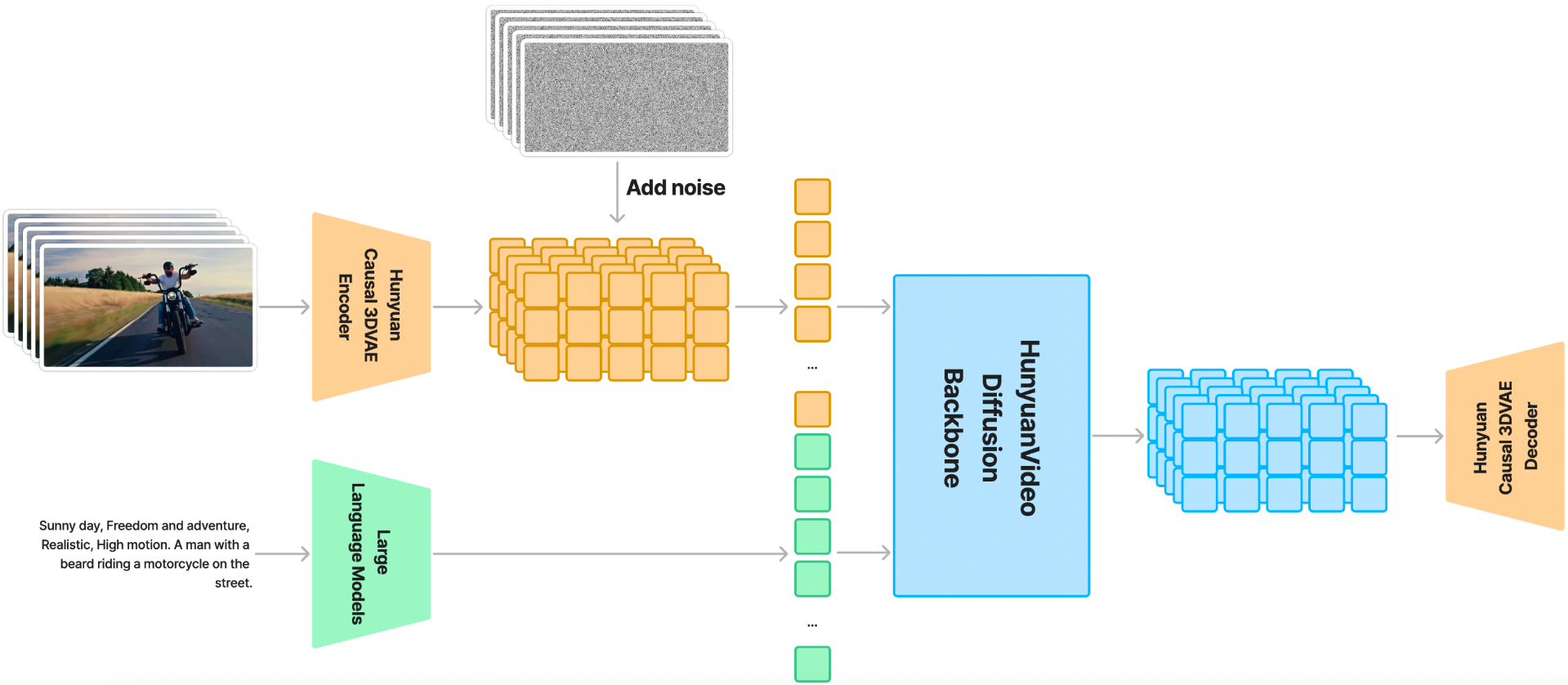
HunyuanVideo Overall Architecture
HunyuanVideo is trained on a spatial-temporally compressed latent space, which is compressed through a Causal 3D VAE. Text prompts are encoded using a large language model, and used as the conditions. Taking Gaussian noise and the conditions as input, our generative model produces an output latent, which is then decoded to images or videos through the 3D VAE decoder.
HunyuanVideo Key Features
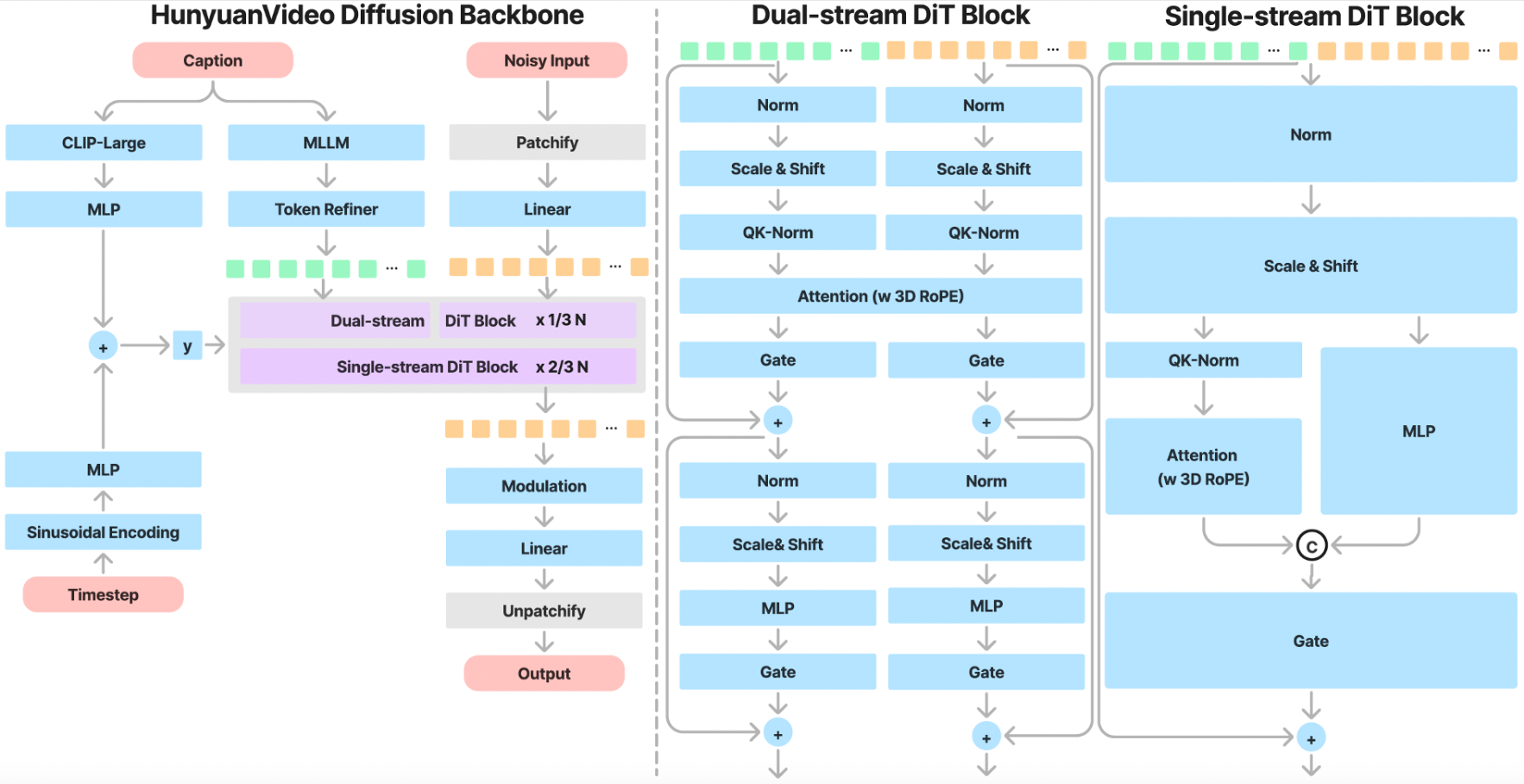
Unified Image and Video Generative Architecture
HunyuanVideo introduces the Transformer design and employs a Full Attention mechanism for unified image and video generation. Specifically, we use a "Dual-stream to Single-stream" hybrid model design for video generation. In the dual-stream phase, video and text tokens are processed independently through multiple Transformer blocks, enabling each modality to learn its own appropriate modulation mechanisms without interference. In the single-stream phase, we concatenate the video and text tokens and feed them into subsequent Transformer blocks for effective multimodal information fusion. This design captures complex interactions between visual and semantic information, enhancing overall model performance.
MLLM Text Encoder
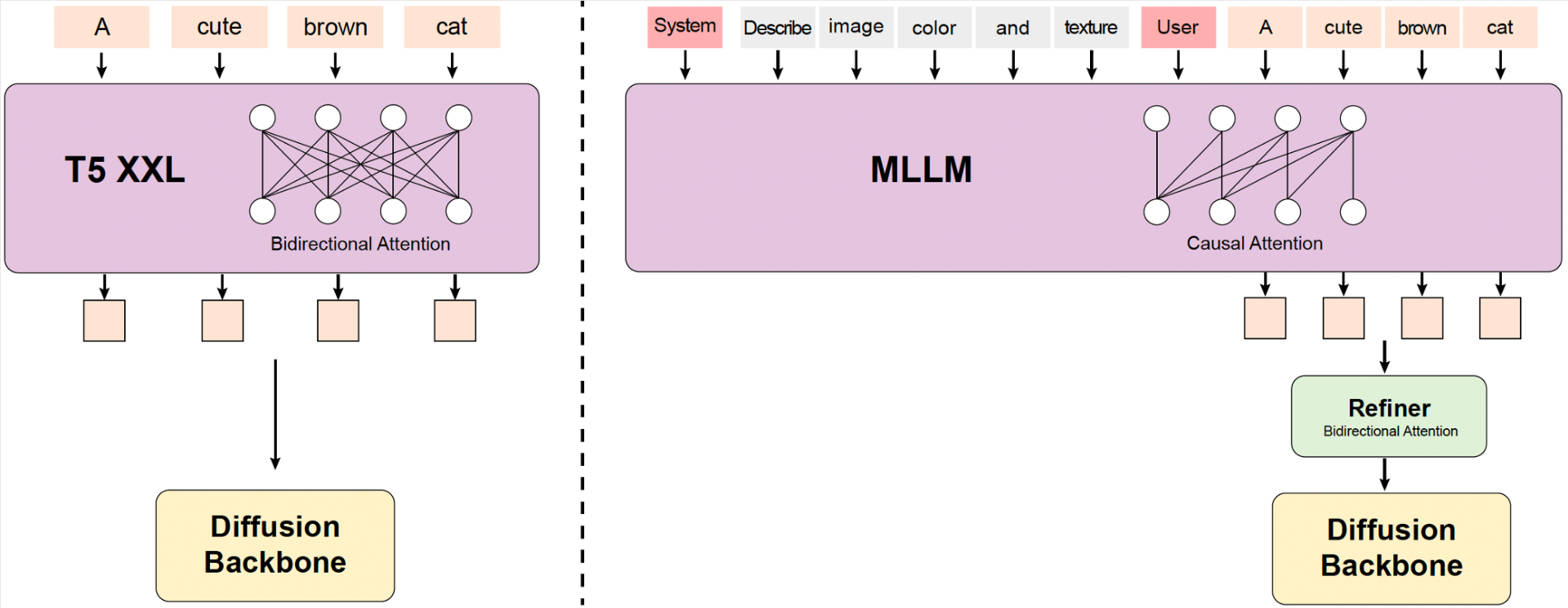
Some previous text-to-video models typically use pre-trained CLIP and T5-XXL as text encoders where CLIP uses Transformer Encoder and T5 uses an Encoder-Decoder structure. In contrast, we utilize a pre-trained Multimodal Large Language Model (MLLM) with a Decoder-Only structure as our text encoder, which has the following advantages: (i) Compared with T5, MLLM after visual instruction finetuning has better image-text alignment in the feature space, which alleviates the difficulty of the instruction following in diffusion models; (ii) Compared with CLIP, MLLM has demonstrated superior ability in image detail description and complex reasoning; (iii) MLLM can play as a zero-shot learner by following system instructions prepended to user prompts, helping text features pay more attention to key information. In addition, MLLM is based on causal attention while T5-XXL utilizes bidirectional attention that produces better text guidance for diffusion models. Therefore, we introduce an extra bidirectional token refiner to enhance text features.
3D VAE
HunyuanVideo trains a 3D VAE with CausalConv3D to compress pixel-space videos and images into a compact latent space. We set the compression ratios of video length, space, and channel to 4, 8, and 16 respectively. This can significantly reduce the number of tokens for the subsequent diffusion transformer model, allowing us to train videos at the original resolution and frame rate.

Prompt Rewrite
To address the variability in linguistic style and length of user-provided prompts, we fine-tune the Hunyuan-Large model as our prompt rewrite model to adapt the original user prompt to model-preferred prompt.
We provide two rewrite modes: Normal mode and Master mode, which can be called using different prompts. The prompts are shown here. The Normal mode is designed to enhance the video generation model's comprehension of user intent, facilitating a more accurate interpretation of the instructions provided. The Master mode enhances the description of aspects such as composition, lighting, and camera movement, which leans towards generating videos with a higher visual quality. However, this emphasis may occasionally result in the loss of some semantic details.
The Prompt Rewrite Model can be directly deployed and inferred using the Hunyuan-Large original code. We release the weights of the Prompt Rewrite Model here.
Comparisons
To evaluate the performance of HunyuanVideo, we selected five strong baselines from closed-source video generation models. In total, we utilized 1,533 text prompts, generating an equal number of video samples with HunyuanVideo in a single run. For a fair comparison, we conducted inference only once, avoiding any cherry-picking of results. When comparing with the baseline methods, we maintained the default settings for all selected models, ensuring consistent video resolution. Videos were assessed based on three criteria: Text Alignment, Motion Quality, and Visual Quality. More than 60 professional evaluators performed the evaluation. Notably, HunyuanVideo demonstrated the best overall performance, particularly excelling in motion quality. Please note that the evaluation is based on Hunyuan Video's high-quality version. This is different from the currently released fast version.
| Model | Open Source | Duration | Text Alignment | Motion Quality | Visual Quality | Overall | Ranking |
|---|---|---|---|---|---|---|---|
| HunyuanVideo (Ours) | ✔ | 5s | 61.8% | 66.5% | 95.7% | 41.3% | 1 |
| CNTopA (API) | ✘ | 5s | 62.6% | 61.7% | 95.6% | 37.7% | 2 |
| CNTopB (Web) | ✘ | 5s | 60.1% | 62.9% | 97.7% | 37.5% | 3 |
| GEN-3 alpha (Web) | ✘ | 6s | 47.7% | 54.7% | 97.5% | 27.4% | 4 |
| Luma1.6 (API) | ✘ | 5s | 57.6% | 44.2% | 94.1% | 24.8% | 5 |
| CNTopC (Web) | ✘ | 5s | 48.4% | 47.2% | 96.3% | 24.6% | 6 |
Requirements
The following table shows the requirements for running HunyuanVideo model (batch size = 1) to generate videos:
| Model | Setting (height/width/frame) |
GPU Peak Memory |
|---|---|---|
| HunyuanVideo | 720px1280px129f | 60GB |
| HunyuanVideo | 544px960px129f | 45GB |
- An NVIDIA GPU with CUDA support is required.
- The model is tested on a single 80G GPU.
- Minimum: The minimum GPU memory required is 60GB for 720px1280px129f and 45G for 544px960px129f.
- Recommended: We recommend using a GPU with 80GB of memory for better generation quality.
- Tested operating system: Linux
Dependencies and Installation
Begin by cloning the repository:
git clone https://github.com/tencent/HunyuanVideo
cd HunyuanVideo
Installation Guide for Linux
We recommend CUDA versions 12.4 or 11.8 for the manual installation.
Conda's installation instructions are available here.
1. Create conda environment
conda create -n HunyuanVideo python==3.10.9
2. Activate the environment
conda activate HunyuanVideo
3. Install PyTorch and other dependencies using conda
For CUDA 11.8
conda install pytorch==2.4.0 torchvision==0.19.0 torchaudio==2.4.0 pytorch-cuda=11.8 -c pytorch -c nvidia
For CUDA 12.4
conda install pytorch==2.4.0 torchvision==0.19.0 torchaudio==2.4.0 pytorch-cuda=12.4 -c pytorch -c nvidia
4. Install pip dependencies
python -m pip install -r requirements.txt
5. Install flash attention v2 for acceleration (requires CUDA 11.8 or above)
python -m pip install ninja
python -m pip install git+https://github.com/Dao-AILab/flash-attention.git@v2.6.3
6. Install xDiT for parallel inference (It is recommended to use torch 2.4.0 and flash-attn 2.6.3)
python -m pip install xfuser==0.4.0
In case of running into float point exception(core dump) on the specific GPU type, you may try the following solutions:
Option 1: Making sure you have installed CUDA 12.4, CUBLAS>=12.4.5.8, and CUDNN>=9.00 (or simply using our CUDA 12 docker image).
pip install nvidia-cublas-cu12==12.4.5.8
export LD_LIBRARY_PATH=/opt/conda/lib/python3.8/site-packages/nvidia/cublas/lib/
Option 2: Forcing to explictly use the CUDA 11.8 compiled version of Pytorch and all the other packages
pip uninstall -r requirements.txt # uninstall all packages
pip uninstall -y xfuser
pip install torch==2.4.0 --index-url https://download.pytorch.org/whl/cu118
pip install -r requirements.txt
pip install ninja
pip install git+https://github.com/Dao-AILab/flash-attention.git@v2.6.3
pip install xfuser==0.4.0
Additionally, HunyuanVideo also provides a pre-built Docker image. Use the following command to pull and run the docker image.
For CUDA 12.4 (updated to avoid float point exception)
docker pull hunyuanvideo/hunyuanvideo:cuda_12
docker run -itd --gpus all --init --net=host --uts=host --ipc=host --name hunyuanvideo --security-opt=seccomp=unconfined --ulimit=stack=67108864 --ulimit=memlock=-1 --privileged hunyuanvideo/hunyuanvideo:cuda_12
For CUDA 11.8
docker pull hunyuanvideo/hunyuanvideo:cuda_11
docker run -itd --gpus all --init --net=host --uts=host --ipc=host --name hunyuanvideo --security-opt=seccomp=unconfined --ulimit=stack=67108864 --ulimit=memlock=-1 --privileged hunyuanvideo/hunyuanvideo:cuda_11
Download Pretrained Models
The details of download pretrained models are shown here.
Single-gpu Inference
We list the height/width/frame settings we support in the following table.
| Resolution | h/w=9:16 | h/w=16:9 | h/w=4:3 | h/w=3:4 | h/w=1:1 |
|---|---|---|---|---|---|
| 540p | 544px960px129f | 960px544px129f | 624px832px129f | 832px624px129f | 720px720px129f |
| 720p (recommended) | 720px1280px129f | 1280px720px129f | 1104px832px129f | 832px1104px129f | 960px960px129f |
Using Command Line
cd HunyuanVideo
python3 sample_video.py \
--video-size 720 1280 \
--video-length 129 \
--infer-steps 50 \
--prompt "A cat walks on the grass, realistic style." \
--flow-reverse \
--use-cpu-offload \
--save-path ./results
Run a Gradio Server
python3 gradio_server.py --flow-reverse
# set SERVER_NAME and SERVER_PORT manually
# SERVER_NAME=0.0.0.0 SERVER_PORT=8081 python3 gradio_server.py --flow-reverse
More Configurations
We list some more useful configurations for easy usage:
| Argument | Default | Description |
|---|---|---|
--prompt |
None | The text prompt for video generation |
--video-size |
720 1280 | The size of the generated video |
--video-length |
129 | The length of the generated video |
--infer-steps |
50 | The number of steps for sampling |
--embedded-cfg-scale |
6.0 | Embedded Classifier free guidance scale |
--flow-shift |
7.0 | Shift factor for flow matching schedulers |
--flow-reverse |
False | If reverse, learning/sampling from t=1 -> t=0 |
--seed |
None | The random seed for generating video, if None, we init a random seed |
--use-cpu-offload |
False | Use CPU offload for the model load to save more memory, necessary for high-res video generation |
--save-path |
./results | Path to save the generated video |
Parallel Inference on Multiple GPUs by xDiT
xDiT is a Scalable Inference Engine for Diffusion Transformers (DiTs) on multi-GPU Clusters. It has successfully provided low-latency parallel inference solutions for a variety of DiTs models, including mochi-1, CogVideoX, Flux.1, SD3, etc. This repo adopted the Unified Sequence Parallelism (USP) APIs for parallel inference of the HunyuanVideo model.
Using Command Line
For example, to generate a video with 8 GPUs, you can use the following command:
cd HunyuanVideo
torchrun --nproc_per_node=8 sample_video.py \
--video-size 1280 720 \
--video-length 129 \
--infer-steps 50 \
--prompt "A cat walks on the grass, realistic style." \
--flow-reverse \
--seed 42 \
--ulysses-degree 8 \
--ring-degree 1 \
--save-path ./results
You can change the --ulysses-degree and --ring-degree to control the parallel configurations for the best performance. The valid parallel configurations are shown in the following table.
| --video-size | --video-length | --ulysses-degree x --ring-degree | --nproc_per_node |
|---|---|---|---|
| 1280 720 or 720 1280 | 129 | 8x1,4x2,2x4,1x8 | 8 |
| 1280 720 or 720 1280 | 129 | 1x5 | 5 |
| 1280 720 or 720 1280 | 129 | 4x1,2x2,1x4 | 4 |
| 1280 720 or 720 1280 | 129 | 3x1,1x3 | 3 |
| 1280 720 or 720 1280 | 129 | 2x1,1x2 | 2 |
| 1104 832 or 832 1104 | 129 | 4x1,2x2,1x4 | 4 |
| 1104 832 or 832 1104 | 129 | 3x1,1x3 | 3 |
| 1104 832 or 832 1104 | 129 | 2x1,1x2 | 2 |
| 960 960 | 129 | 6x1,3x2,2x3,1x6 | 6 |
| 960 960 | 129 | 4x1,2x2,1x4 | 4 |
| 960 960 | 129 | 3x1,1x3 | 3 |
| 960 960 | 129 | 1x2,2x1 | 2 |
| 960 544 or 544 960 | 129 | 6x1,3x2,2x3,1x6 | 6 |
| 960 544 or 544 960 | 129 | 4x1,2x2,1x4 | 4 |
| 960 544 or 544 960 | 129 | 3x1,1x3 | 3 |
| 960 544 or 544 960 | 129 | 1x2,2x1 | 2 |
| 832 624 or 624 832 | 129 | 4x1,2x2,1x4 | 4 |
| 624 832 or 624 832 | 129 | 3x1,1x3 | 3 |
| 832 624 or 624 832 | 129 | 2x1,1x2 | 2 |
| 720 720 | 129 | 1x5 | 5 |
| 720 720 | 129 | 3x1,1x3 | 3 |
| Latency (Sec) for 1280x720 (129 frames 50 steps) on 8xGPU | | | |
| :---: | | | | :---: | :---: | :---: |
| 1 | 2 | 4 | 8 |
|---|---|---|---|
| 1904.08 | 934.09 (2.04x) | 514.08 (3.70x) | 337.58 (5.64x) |
FP8 Inference
Using HunyuanVideo with FP8 quantized weights, which saves about 10GB of GPU memory. You can download the weights and weight scales from Huggingface.
Using Command Line
Here, you must explicitly specify the FP8 weight path. For example, to generate a video with fp8 weights, you can use the following command:
cd HunyuanVideo
DIT_CKPT_PATH={PATH_TO_FP8_WEIGHTS}/{WEIGHT_NAME}_fp8.pt
python3 sample_video.py \
--dit-weight ${DIT_CKPT_PATH} \
--video-size 1280 720 \
--video-length 129 \
--infer-steps 50 \
--prompt "A cat walks on the grass, realistic style." \
--seed 42 \
--embedded-cfg-scale 6.0 \
--flow-shift 7.0 \
--flow-reverse \
--use-cpu-offload \
--use-fp8 \
--save-path ./results
BibTeX
If you find HunyuanVideo useful for your research and applications, please cite using this BibTeX:
@misc{kong2024hunyuanvideo,
title={HunyuanVideo: A Systematic Framework For Large Video Generative Models},
author={Weijie Kong, Qi Tian, Zijian Zhang, Rox Min, Zuozhuo Dai, Jin Zhou, Jiangfeng Xiong, Xin Li, Bo Wu, Jianwei Zhang, Kathrina Wu, Qin Lin, Aladdin Wang, Andong Wang, Changlin Li, Duojun Huang, Fang Yang, Hao Tan, Hongmei Wang, Jacob Song, Jiawang Bai, Jianbing Wu, Jinbao Xue, Joey Wang, Junkun Yuan, Kai Wang, Mengyang Liu, Pengyu Li, Shuai Li, Weiyan Wang, Wenqing Yu, Xinchi Deng, Yang Li, Yanxin Long, Yi Chen, Yutao Cui, Yuanbo Peng, Zhentao Yu, Zhiyu He, Zhiyong Xu, Zixiang Zhou, Zunnan Xu, Yangyu Tao, Qinglin Lu, Songtao Liu, Dax Zhou, Hongfa Wang, Yong Yang, Di Wang, Yuhong Liu, and Jie Jiang, along with Caesar Zhong},
year={2024},
archivePrefix={arXiv preprint arXiv:2412.03603},
primaryClass={cs.CV},
url={https://arxiv.org/abs/2412.03603},
}
Acknowledgements
We would like to thank the contributors to the SD3, FLUX, Llama, LLaVA, Xtuner, diffusers and HuggingFace repositories, for their open research and exploration. Additionally, we also thank the Tencent Hunyuan Multimodal team for their help with the text encoder.
🖼️ LTX2.3 Video Generation using ComfyUI
💀 Why you should use my workflow instead of official workflow ?
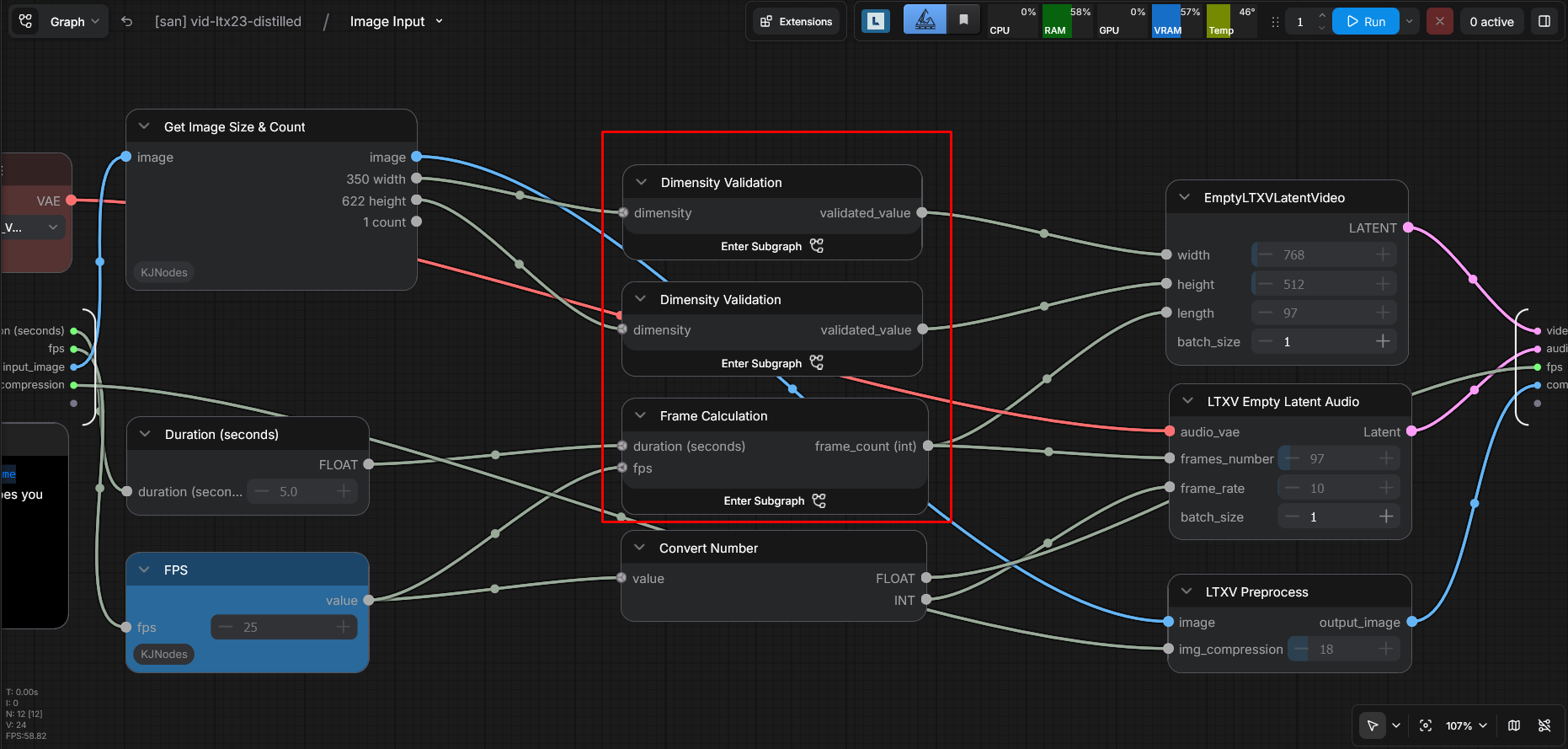
This workflow is preferred over the original because the latter imposes strict input constraints, requiring the image width and height to be integers divisible by 64. Additionally, the frame count must be a multiple of 8 plus 1 (e.g., $8n + 1$). In contrast, this updated workflow features an automated adjustment mechanism that seamlessly handles any input dimensions.
💀 Download Workflow
I provide 2 links provider, 1 is my selfhost with faster download speed than GoogleDrive. But GoogleDrive make sure the persistent.
- Full mode: ChenjiaDrive / GoogleDrive
- Distilled: ChenjiaDrive / GoogleDrive
- Kijai version: ChenjiaDrive / GoogleDrive
- Preview version: ChenjiaDrive / GoogleDrive
⚠️⚠️⚠️⚠️⚠️⚠️⚠️⚠️⚠️⚠️⚠️⚠️⚠️⚠️⚠️⚠️⚠️⚠️⚠️⚠️⚠️⚠️⚠️⚠️⚠️⚠️⚠️⚠️⚠️⚠️⚠️⚠️⚠️⚠️⚠️⚠️⚠️⚠️
Important !
Do NOT install package ComfyUI-LTXVideo package from official page because it depend on deprecated package.
And cannot be loaded on newest ComfyUI version.
Please install my fork: sandichhuu/ComfyUI-LTXVideo
⚠️⚠️⚠️⚠️⚠️⚠️⚠️⚠️⚠️⚠️⚠️⚠️⚠️⚠️⚠️⚠️⚠️⚠️⚠️⚠️⚠️⚠️⚠️⚠️⚠️⚠️⚠️⚠️⚠️⚠️⚠️⚠️⚠️⚠️⚠️⚠️⚠️⚠️
💀 Hardware Tested
- CPU: Ryzen 5 5500.
- GPU: RTX 3060 12GB VRAM (1x)
- RAM: DDR4 3200 32GB.
Result: 83-578 seconds for video 5 seconds.
💀 Know Bugs
Workflow 1, 2 not working now because the bug from ComfyUI, output is black or errors. You can download first, use later. Workflow 3, 4 using Kijai models and working, but slower than models from Unsloth.
💀 Sorry
I cannot provide preview version using taeltx2_3.safetensor for preview.
The preview version using Kijai (text_encoder & vae) is fast enough, only 83 seconds to generate 5 seconds video.
Screenshot

💀 Thank you
I’m sharing these artifacts completely free and open-source because many of you requested them, even though I don't make any profit from this. Please leave a like—even a small gesture like that means the world to me. It's a huge moral support and recognition of the effort I'm putting into helping the community. Thank you so much for your trust and support!