# 🐙 Blogs
# 🐙 GPU COMPARISON MATRIX FOR AI / LLM WORKLOADS
Detailed technical comparison between five graphics cards: **RTX 3060 12GB**, **RTX 5060 Ti 16GB**, **9060 XT 16GB**, **Arc A770 16GB**, and **Arc B60 24GB**, focusing on core metrics for AI, Deep Learning, and Local LLM deployments.
## 📊 Detailed Comparison Matrix
| Metric | NVIDIA GeForce RTX 3060 | NVIDIA GeForce RTX 5060 Ti | AMD Radeon RX 9060 XT | Intel Arc A770 (Graphics) | Intel Arc B60 (Workstation) |
| :--- | :---: | :---: | :---: | :---: | :---: |
| **1. VRAM Capacity** | 12 GB GDDR6 | 16 GB GDDR7 | 16 GB GDDR6 | 16 GB GDDR6 | **24 GB GDDR6** |
| **2. Memory Speed** | 15 Gbps
*(Bus: 192-bit)*
*(Bandwidth: 360 GB/s)* | **28 Gbps**
*(Bus: 128-bit)*
*(Bandwidth: 448 GB/s)* | 16 Gbps
*(Bus: 128-bit)*
*(Bandwidth: 320 GB/s)* | 17.5 Gbps
*(Bus: **256-bit**)*
*(Bandwidth: **560 GB/s**)* | 19 Gbps
*(Bus: 192-bit)*
*(Bandwidth: 456 GB/s)* |
| **3. AI Compute (INT8 TOPS)** | ~244 TOPS
*(Tensor Cores Gen 3)* | **~759 TOPS**
*(Tensor Cores Gen 5)* | ~410 TOPS
*(RDNA 4 AI Accelerators)* | ~256 TOPS
*(XMX Engines)* | ~197 TOPS
*(XMX Engines Gen 2)* |
| **4. Release Date** | Q1 / 2021 | Q1 / 2025 | Q1 / 2025 | Q4 / 2022 | Q1 / 2025 |
---
## 💡 Quick Analysis for AI / Local LLM Engineers
1. **VRAM & Model Capacity:**
* The **Intel Arc B60** stands out with its massive **24GB VRAM**, matching upper-tier workstation cards in capacity. This allows it to comfortably host larger models (up to quantized 32B or heavily compressed 70B models) entirely within the GPU memory.
* The **5060 Ti, 9060 XT, and A770** sit comfortably at **16GB VRAM**, which is the ideal sweet spot for running mid-sized models like *Llama-3-8B* or *Qwen-2.5-14B* without system RAM spillover.
* The **RTX 3060** falls behind with **12GB**, but remains a budget-friendly entry-level gateway card.
2. **Memory Bandwidth (Token Generation Speed):**
* The older **Intel Arc A770** still holds the highest raw bandwidth (**560 GB/s**) due to its unconstrained 256-bit bus width, ensuring fluid data transfer during inference loops.
* The **Arc B60** sits at **456 GB/s**; even with its 24GB capacity, the 192-bit bus acts as a subtle speed limit compared to high-end architectures.
* The **RTX 5060 Ti** achieves a highly efficient **448 GB/s** by leveraging next-gen **GDDR7 28 Gbps** modules, overcoming its narrow 128-bit bus constraint.
* The **RX 9060 XT** is the most bottlenecked here at **320 GB/s**, which slightly bottlenecks its token-per-second output during pure LLM inference tasks.
3. **Raw Inference Performance (INT8 TOPS):**
* The **RTX 5060 Ti** absolutely obliterates the field with a staggering **759 TOPS**, making it the premier choice for fine-tuning, computer vision, and heavy image generation loops.
* The **RX 9060 XT** occupies a strong mid-range position at **~410 TOPS**, representing a substantial compute upgrade for AMD's mainstream platform.
* The **Intel Arc B60** significantly underdelivers in compute density, dropping below 200 TOPS—effectively losing to both its predecessor (A770) and even the aging RTX 3060 in raw matrix mathematical operations.
4. **Software Ecosystem & Compatibility:**
* **NVIDIA (3060, 5060 Ti):** Seamless out-of-the-box operation natively powered by **CUDA**. 100% day-one compatibility with major frameworks (PyTorch, HuggingFace, vLLM).
* **AMD (9060 XT):** Relies on **ROCm**. Highly performant and native on Linux-based environments (via Ollama or Llama.cpp), though Windows support requires slightly more setup.
* **Intel (A770, B60):** Requires reliance on the **OneAPI / OpenVINO** toolkit or IPEX (Intel Extension for PyTorch), demanding a higher degree of manual environment configuration and command-line troubleshooting.
---
# 🐙 Qwen3.7 Max compare with others
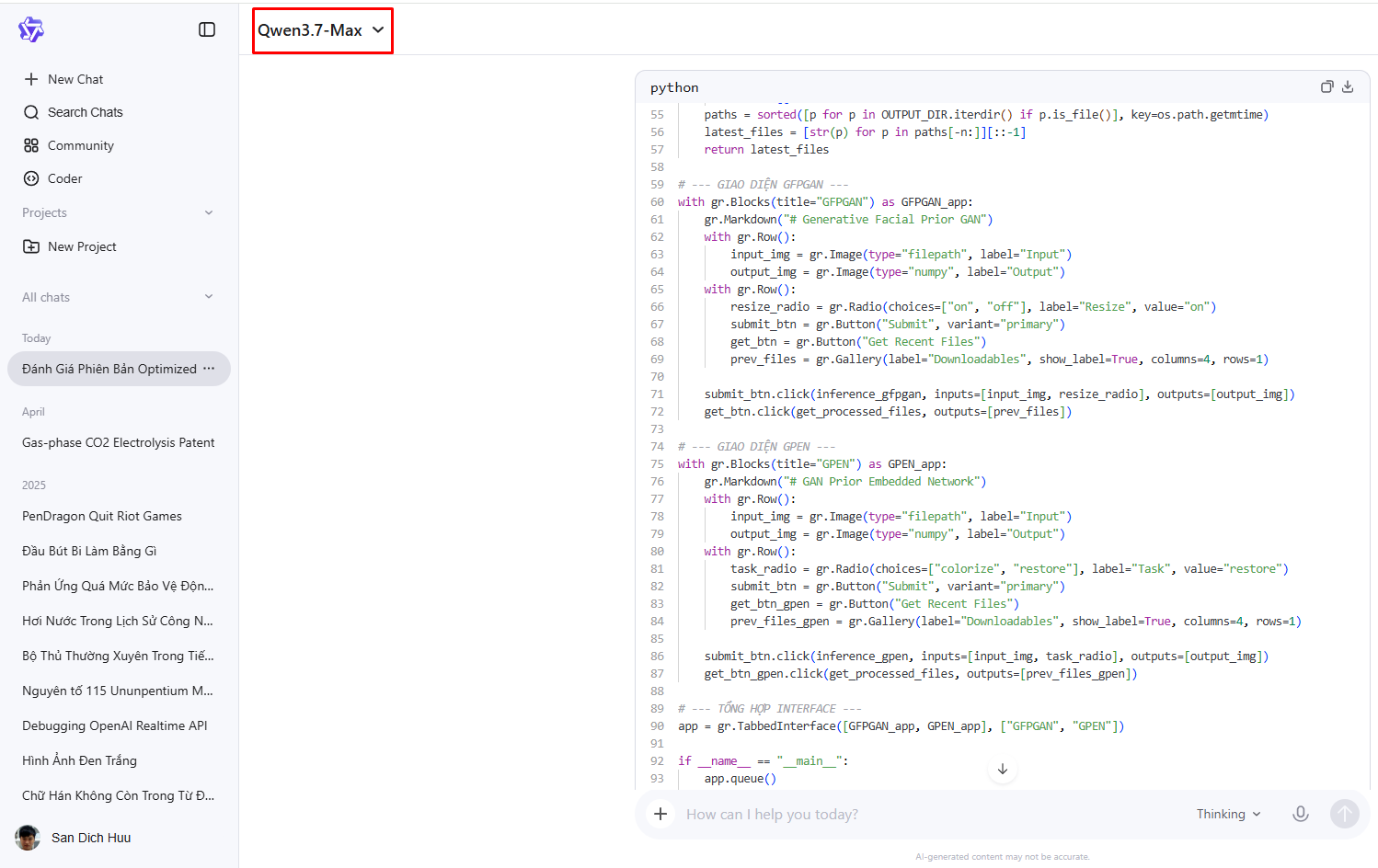
This is writing about Qwen3.7 Max review and fix a random python code from github.
> **input prompt:** Review and help me optimize this python file.
### **💻 [Original](https://github.com/giahuy2201/GFPGAN-webui/blob/main/app/main.py)**
Click to show code
```python
from subprocess import Popen, PIPE
import gradio as gr
import numpy as np
import cv2
import os
from pathlib import Path
def inference_gfpgan(img_path, resize):
return run_task("_gfpgan", img_path, resize=resize)
def inference_gpen(img_path, task):
return run_task("_gpen", img_path, task=task)
def run_task(model, img_path, task="restore", resize="on"):
# do the inference in a seperate process to avoid high gpu idle power consumption of pytorch
p = Popen(["python", "app/%s.py" % model, img_path, task, resize], stdout=PIPE, stderr=PIPE)
# info
img_name = os.path.basename(img_path)
basename, ext = os.path.splitext(img_name)
model = model.strip("_")
print(f"Started {model.upper()} {task} {img_name} ...")
# wait for it to finish
stdout, stderr = p.communicate()
print("stdout:\n", stdout)
print("stderr:\n", stderr)
# retrieved the restored image
extension = ext[1:]
restored_img_path = os.path.join(
"outputs", f"{basename}_{model}_{task}.{extension}"
)
if os.path.isfile(restored_img_path):
restored_img = cv2.imread(restored_img_path)
restored_img = cv2.cvtColor(restored_img, cv2.COLOR_BGR2RGB)
print(f"Finished {model.upper()} {task} {restored_img_path}")
return restored_img
else:
gr.Error("Result not found!")
return None
def get_processed_files(n=4):
"""
Return last n files
"""
paths = sorted(Path("outputs").iterdir(), key=os.path.getmtime)
files = []
for i in range(min(n,len(paths))):
files.append(str(paths[-(i + 1)]))
return files
with gr.Blocks(title="GFPGAN") as GFPGAN_app:
gr.Markdown(
"""
# Generative Facial Prior GAN
"""
)
with gr.Row():
input_img = gr.Image(type="filepath", label="Input")
output_img = gr.Image(type="numpy", label="Output")
with gr.Row():
resize_radio = gr.Radio(
choices=["on", "off"], label="Resize", value="on"
)
submit_btn = gr.Button("Submit", variant="primary")
get_btn = gr.Button("Get")
prev_files = gr.Gallery(
label="Downloadables",
show_label=False,
elem_id="gallery",
columns=[2],
rows=[1],
object_fit="contain",
height="auto",
allow_preview=False,
)
submit_btn.click(inference_gfpgan, inputs=[input_img,resize_radio], outputs=[output_img])
get_btn.click(get_processed_files, outputs=[prev_files])
with gr.Blocks(title="GPEN") as GPEN_app:
gr.Markdown(
"""
# GAN Prior Embedded Network
"""
)
with gr.Row():
input_img = gr.Image(type="filepath", label="Input")
output_img = gr.Image(type="numpy", label="Output")
with gr.Row():
task_radio = gr.Radio(
choices=["colorize", "restore"], label="Task", value="colorize"
)
submit_btn = gr.Button("Submit", variant="primary")
submit_btn.click(
inference_gpen, inputs=[input_img, task_radio], outputs=[output_img]
)
get_btn.click(get_processed_files, outputs=[prev_files])
app = gr.TabbedInterface([GFPGAN_app, GPEN_app], ["GFPGAN", "GPEN"])
app.queue()
app.launch(server_name="0.0.0.0")
```
### **🤖 Gemini**
Click to show code
```python
from subprocess import Popen, PIPE
import gradio as gr
import cv2
import os
from pathlib import Path
OUTPUT_DIR = Path("outputs")
OUTPUT_DIR.mkdir(exist_ok=True)
def run_task(model: str, img_path: str, task: str = "restore", resize: str = "on"):
img_path_obj = Path(img_path)
basename = img_path_obj.stem
ext = img_path_obj.suffix
model_clean = model.strip("_")
print(f"Started {model_clean.upper()} | Task: {task} | Image: {img_path_obj.name} ...")
p = Popen(
["python", f"app/{model}.py", str(img_path_obj), task, resize],
stdout=PIPE,
stderr=PIPE
)
stdout, stderr = p.communicate()
print("--- STDOUT ---")
print(stdout.decode("utf-8", errors="ignore"))
print("--- STDERR ---")
print(stderr.decode("utf-8", errors="ignore"))
extension = ext.lstrip(".")
restored_img_path = OUTPUT_DIR / f"{basename}_{model_clean}_{task}.{extension}"
if restored_img_path.is_file():
restored_img = cv2.imread(str(restored_img_path))
restored_img = cv2.cvtColor(restored_img, cv2.COLOR_BGR2RGB)
print(f"Finished {model_clean.upper()} -> {restored_img_path}")
return restored_img
else:
raise gr.Error(f"Result not found at {restored_img_path}!")
def inference_gfpgan(img_path, resize):
return run_task("_gfpgan", img_path, task="restore", resize=resize)
def inference_gpen(img_path, task):
return run_task("_gpen", img_path, task=task, resize="on")
def get_processed_files(n=4):
if not OUTPUT_DIR.exists():
return []
paths = sorted([p for p in OUTPUT_DIR.iterdir() if p.is_file()], key=os.path.getmtime)
latest_files = [str(p) for p in paths[-n:]][::-1]
return latest_files
with gr.Blocks(title="GFPGAN") as GFPGAN_app:
gr.Markdown("# Generative Facial Prior GAN")
with gr.Row():
input_img = gr.Image(type="filepath", label="Input")
output_img = gr.Image(type="numpy", label="Output")
with gr.Row():
resize_radio = gr.Radio(choices=["on", "off"], label="Resize", value="on")
submit_btn = gr.Button("Submit", variant="primary")
get_btn = gr.Button("Get Recent Files")
prev_files = gr.Gallery(
label="Downloadables",
show_label=True,
columns=4,
rows=1,
object_fit="contain",
height="auto",
allow_preview=True,
)
submit_btn.click(inference_gfpgan, inputs=[input_img, resize_radio], outputs=[output_img])
get_btn.click(get_processed_files, outputs=[prev_files])
with gr.Blocks(title="GPEN") as GPEN_app:
gr.Markdown("# GAN Prior Embedded Network")
with gr.Row():
input_img = gr.Image(type="filepath", label="Input")
output_img = gr.Image(type="numpy", label="Output")
with gr.Row():
task_radio = gr.Radio(choices=["colorize", "restore"], label="Task", value="restore")
submit_btn = gr.Button("Submit", variant="primary")
get_btn_gpen = gr.Button("Get Recent Files") # Tạo nút riêng biệt cho tab này
prev_files_gpen = gr.Gallery(
label="Downloadables",
show_label=True,
columns=4,
rows=1,
object_fit="contain",
height="auto",
allow_preview=True,
)
submit_btn.click(inference_gpen, inputs=[input_img, task_radio], outputs=[output_img])
get_btn_gpen.click(get_processed_files, outputs=[prev_files_gpen])
app = gr.TabbedInterface([GFPGAN_app, GPEN_app], ["GFPGAN", "GPEN"])
if __name__ == "__main__":
app.queue()
app.launch(server_name="0.0.0.0")
```
### **🤖 GPT5**
Click to show code
```python
from __future__ import annotations
import logging
import sys
import uuid
from pathlib import Path
from subprocess import PIPE, Popen, TimeoutExpired
from typing import Literal
import gradio as gr
OUTPUT_DIR = Path("outputs")
OUTPUT_DIR.mkdir(parents=True, exist_ok=True)
APP_DIR = Path("app")
PROCESS_TIMEOUT = 300
MAX_OUTPUT_FILES = 100
CONCURRENCY_LIMIT = 1
logging.basicConfig(
level=logging.INFO,
format="%(asctime)s | %(levelname)s | %(message)s",
)
logger = logging.getLogger(__name__)
TaskType = Literal["restore", "colorize"]
ResizeType = Literal["on", "off"]
def cleanup_old_outputs(max_files: int = MAX_OUTPUT_FILES) -> None:
"""
if not img_path:
raise gr.Error("No image provided")
path = Path(img_path)
if not path.exists():
raise gr.Error("Input image does not exist")
if not path.is_file():
raise gr.Error("Input path is not a file")
return path
def build_output_path(
basename: str,
extension: str,
model_name: str,
task: str,
job_id: str,
) -> Path:
"""
Create unique output filename.
"""
filename = (
f"{basename}_{job_id}_{model_name}_{task}.{extension}"
)
return OUTPUT_DIR / filename
def get_latest_output_file(
basename: str,
model_name: str,
task: str,
) -> Path | None:
"""
Find latest generated output matching pattern.
"""
pattern = f"{basename}_*_{model_name}_{task}.*"
matches = sorted(
OUTPUT_DIR.glob(pattern),
key=lambda p: p.stat().st_mtime,
reverse=True,
)
return matches[0] if matches else None
def run_task(
stdout=PIPE,
stderr=PIPE,
text=True,
)
try:
stdout, stderr = process.communicate(timeout=PROCESS_TIMEOUT)
except TimeoutExpired:
process.kill()
logger.error(
f"Inference timeout | "
f"model={model_name} | "
f"image={input_path.name}"
)
raise gr.Error(
f"Inference timeout after {PROCESS_TIMEOUT} seconds"
)
logger.info(f"STDOUT:\n{stdout}")
if stderr.strip():
logger.warning(f"STDERR:\n{stderr}")
if process.returncode != 0:
logger.error(
f"Inference failed | "
f"returncode={process.returncode}"
)
raise gr.Error(
f"Inference process failed:\n\n{stderr}"
)
output_path = get_latest_output_file(
basename=basename,
model_name=model_name,
task=task,
)
if output_path is None:
logger.error("Output file not found")
raise gr.Error("Inference finished but output file not found")
logger.info(f"Inference completed: {output_path.name}")
cleanup_old_outputs()
return str(output_path)
def inference_gfpgan(img_path: str, resize: ResizeType):
return run_task(
model="_gfpgan",
img_path=img_path,
task="restore",
resize=resize,
)
def inference_gpen(img_path: str, task: TaskType):
return run_task(
model="_gpen",
img_path=img_path,
task=task,
resize="on",
)
def get_processed_files(n: int = 8):
"""
Return latest processed files.
"""
files = sorted(
[p for p in OUTPUT_DIR.iterdir() if p.is_file()],
key=lambda p: p.stat().st_mtime,
reverse=True,
)
return [str(file) for file in files[:n]]
with gr.Blocks(title="GFPGAN") as GFPGAN_app:
gr.Markdown("# GFPGAN Face Restoration")
with gr.Row():
input_img = gr.Image(
type="filepath",
label="Input Image",
)
output_img = gr.Image(
type="filepath",
label="Output Image",
)
with gr.Row():
resize_radio = gr.Radio(
choices=["on", "off"],
value="on",
label="Resize",
)
submit_btn = gr.Button(
"Restore Face",
variant="primary",
)
get_btn = gr.Button("Recent Files")
prev_files = gr.Gallery(
label="Recent Outputs",
columns=4,
rows=2,
object_fit="contain",
height="auto",
allow_preview=True,
)
submit_btn.click(
inference_gfpgan,
inputs=[input_img, resize_radio],
outputs=[output_img],
)
get_btn.click(
get_processed_files,
outputs=[prev_files],
)
with gr.Blocks(title="GPEN") as GPEN_app:
gr.Markdown("# GPEN Face Enhancement")
with gr.Row():
input_img = gr.Image(
type="filepath",
label="Input Image",
)
output_img = gr.Image(
type="filepath",
label="Output Image",
)
with gr.Row():
task_radio = gr.Radio(
choices=["restore", "colorize"],
value="restore",
label="Task",
)
submit_btn = gr.Button(
"Run GPEN",
variant="primary",
)
get_btn = gr.Button("Recent Files")
prev_files = gr.Gallery(
label="Recent Outputs",
columns=4,
rows=2,
object_fit="contain",
height="auto",
allow_preview=True,
)
submit_btn.click(
inference_gpen,
inputs=[input_img, task_radio],
outputs=[output_img],
)
get_btn.click(
get_processed_files,
outputs=[prev_files],
)
app = gr.TabbedInterface(
[GFPGAN_app, GPEN_app],
["GFPGAN", "GPEN"],
)
if __name__ == "__main__":
logger.info("Starting Gradio application")
app.queue(
default_concurrency_limit=CONCURRENCY_LIMIT,
)
app.launch(
server_name="0.0.0.0",
show_error=True,
)
```
### **🤖 Qwen3.7**
Click to show code
```python
from subprocess import Popen, PIPE
import gradio as gr
import cv2
import os
from pathlib import Path
OUTPUT_DIR = Path("outputs")
OUTPUT_DIR.mkdir(exist_ok=True)
def run_task(model: str, img_path: str, task: str = "restore", resize: str = "on"):
img_path_obj = Path(img_path)
basename = img_path_obj.stem
ext = img_path_obj.suffix
model_clean = model.strip("_ ")
print(f"Started {model_clean.upper()} | Task: {task} | Image: {img_path_obj.name}...")
p = Popen(
["python", f"app/{model}.py", str(img_path_obj), task, resize],
stdout=PIPE,
stderr=PIPE
)
stdout, stderr = p.communicate()
print("--- STDOUT ---")
print(stdout.decode("utf-8", errors="ignore"))
print("--- STDERR ---")
print(stderr.decode("utf-8", errors="ignore"))
extension = ext.lstrip(".")
restored_img_path = OUTPUT_DIR / f"{basename}{model}_{task}.{extension}"
if restored_img_path.is_file():
restored_img = cv2.imread(str(restored_img_path))
if restored_img is None:
raise gr.Error(f"Không thể đọc ảnh: {restored_img_path}")
restored_img = cv2.cvtColor(restored_img, cv2.COLOR_BGR2RGB)
print(f"Finished {model_clean.upper()} -> {restored_img_path}")
return restored_img
else:
raise gr.Error(f"Không tìm thấy kết quả tại {restored_img_path}!")
def inference_gfpgan(img_path, resize):
return run_task("_gfpgan", img_path, task="restore", resize=resize)
def inference_gpen(img_path, task):
return run_task("_gpen", img_path, task=task, resize="on")
def get_processed_files(n=4):
if not OUTPUT_DIR.exists():
return []
paths = sorted([p for p in OUTPUT_DIR.iterdir() if p.is_file()], key=os.path.getmtime)
latest_files = [str(p) for p in paths[-n:]][::-1]
return latest_files
with gr.Blocks(title="GFPGAN") as GFPGAN_app:
gr.Markdown("# Generative Facial Prior GAN")
with gr.Row():
input_img = gr.Image(type="filepath", label="Input")
output_img = gr.Image(type="numpy", label="Output")
with gr.Row():
resize_radio = gr.Radio(choices=["on", "off"], label="Resize", value="on")
submit_btn = gr.Button("Submit", variant="primary")
get_btn = gr.Button("Get Recent Files")
prev_files = gr.Gallery(label="Downloadables", show_label=True, columns=4, rows=1)
submit_btn.click(inference_gfpgan, inputs=[input_img, resize_radio], outputs=[output_img])
get_btn.click(get_processed_files, outputs=[prev_files])
with gr.Blocks(title="GPEN") as GPEN_app:
gr.Markdown("# GAN Prior Embedded Network")
with gr.Row():
input_img = gr.Image(type="filepath", label="Input")
output_img = gr.Image(type="numpy", label="Output")
with gr.Row():
task_radio = gr.Radio(choices=["colorize", "restore"], label="Task", value="restore")
submit_btn = gr.Button("Submit", variant="primary")
get_btn_gpen = gr.Button("Get Recent Files")
prev_files_gpen = gr.Gallery(label="Downloadables", show_label=True, columns=4, rows=1)
submit_btn.click(inference_gpen, inputs=[input_img, task_radio], outputs=[output_img])
get_btn_gpen.click(get_processed_files, outputs=[prev_files_gpen])
app = gr.TabbedInterface([GFPGAN_app, GPEN_app], ["GFPGAN", "GPEN"])
if __name__ == "__main__":
app.queue()
app.launch(server_name="0.0.0.0")
```
### **🍒 Summary**
> In my opinion
> **Qwen3.7** is better than others in coding task, especially Python language
> GPT5 insert tripple quote markdown, this is wrong coding rule.
> Gemini looking good.
### **🖼️ Screenshot**
[](https://wiki.chenjia.org/uploads/images/gallery/2026-05/7fyEA5JmzEeWNZF0-image-1779880923865.png)
# 🐙 Dense model vs MoE model
### Introduction
Modern Large Language Models (LLMs) are generally built using two major architectural approaches:
* **Dense Models**
* **Mixture of Experts (MoE) Models**
Both approaches aim to improve intelligence, reasoning, scalability, and inference efficiency, but they solve these problems in different ways.
This document provides a simplified overview focused on:
* Gemma 4
* Qwen 3.6
---
### What is a Dense AI Model?
A **Dense Model** is the traditional architecture used in most earlier LLMs.
In a dense model:
* Every layer is active during inference.
* All parameters participate in every token generation step.
* The entire neural network is used for every request.
### Simple Analogy
Imagine a company where:
* Every employee joins every meeting.
* Every employee works on every task.
This guarantees consistency, but it becomes expensive and inefficient as the company grows.
---
## Characteristics of Dense Models
### Advantages
- Simpler Architecture
- Dense models are easier to:
* train
* optimize
* deploy
* quantize
* fine-tune
- Stable Behavior: Because all parameters are always active
* outputs are more predictable
* reasoning consistency is often stronger
* debugging is easier
- Better Hardware Compatibility: Dense models typically perform better on
* consumer GPUs
* smaller inference servers
* edge AI systems
---
## Disadvantages
- High Compute Cost. Every token requires the full model to run, this means:
* higher VRAM usage
* higher power consumption
* slower inference at large scales
- Scaling Becomes Expensive. A very large dense model requires:
* massive GPU clusters
* expensive training costs
* large inference infrastructure
---
### What is an MoE (Mixture of Experts) AI Model?
A **Mixture of Experts (MoE)** model divides the network into multiple specialized sub-networks called:
* Experts
Instead of activating the entire model:
* only a small subset of experts are used for each token.
A separate routing system decides:
* which experts should process the current token.
---
### Simple Analogy
Imagine a large company where:
* only the relevant specialists join a meeting.
* finance experts handle finance problems.
* legal experts handle legal problems.
* engineers handle technical problems.
This significantly improves efficiency.
---
## Characteristics of MoE Models
### Advantages
- Much Higher Parameter Count. MoE models can contain:
* hundreds of billions of total parameters while only activating a small portion during inference. This enables:
* stronger knowledge capacity
* better specialization
* improved scaling efficiency
- Lower Active Compute. Even though the model is huge:
* only a fraction of parameters run per token. This can reduce:
* inference cost
* latency
* memory bandwidth pressure
- Better Scaling Efficiency. MoE architectures scale more efficiently than dense architectures at very large sizes. This is one of the biggest reasons modern frontier models increasingly adopt MoE designs.
---
### Disadvantages
- More Complex Architecture. MoE systems require:
* expert routing
* load balancing
* token dispatching
* communication optimization
- Harder Inference Optimization. MoE inference can be difficult on:
* smaller GPUs
* consumer hardware
* low-bandwidth systems
- Expert Imbalance Problems
* certain experts become overloaded
* some experts are underused. This can reduce efficiency or quality if not carefully trained.
---
### Why Do We Need MoE Models?
As AI models grow larger, dense architectures become increasingly expensive.
For example:
* doubling model intelligence using dense scaling may require massive increases in compute.
MoE models solve this by:
* increasing total parameter capacity
* while limiting active compute per token.
This creates a better balance between:
* intelligence
* scalability
* inference efficiency
* training cost
MoE is currently considered one of the most important techniques for scaling frontier AI systems.
---
# Conclusion
Dense and MoE architectures represent two different strategies for scaling modern AI.
Dense models prioritize:
* simplicity
* stability
* deployment accessibility
MoE models prioritize:
* scalability
* specialization
* compute efficiency at massive scale
Gemma 4 demonstrates how highly optimized dense models remain extremely competitive.
Qwen 3.6 demonstrates how MoE architectures enable next-generation scaling for frontier AI systems.
Both approaches are likely to continue evolving together rather than replacing each other entirely.
# 🐙 Tenstorrent TT-LoudBox™ (Wormhole)
[](https://wiki.chenjia.org/uploads/images/gallery/2026-05/ebScBFBIYPhTW2b8-image-1779622371157.png)
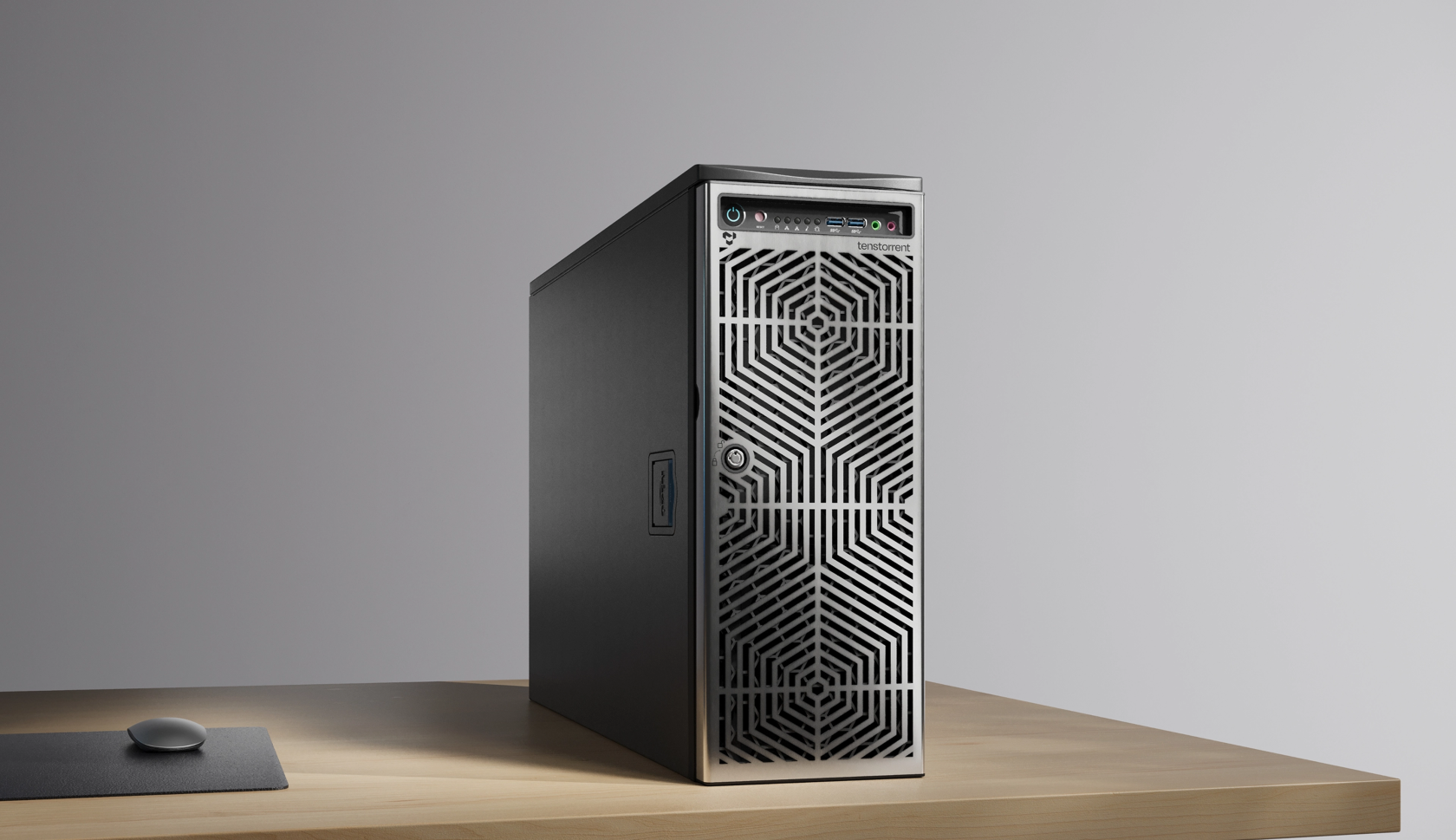
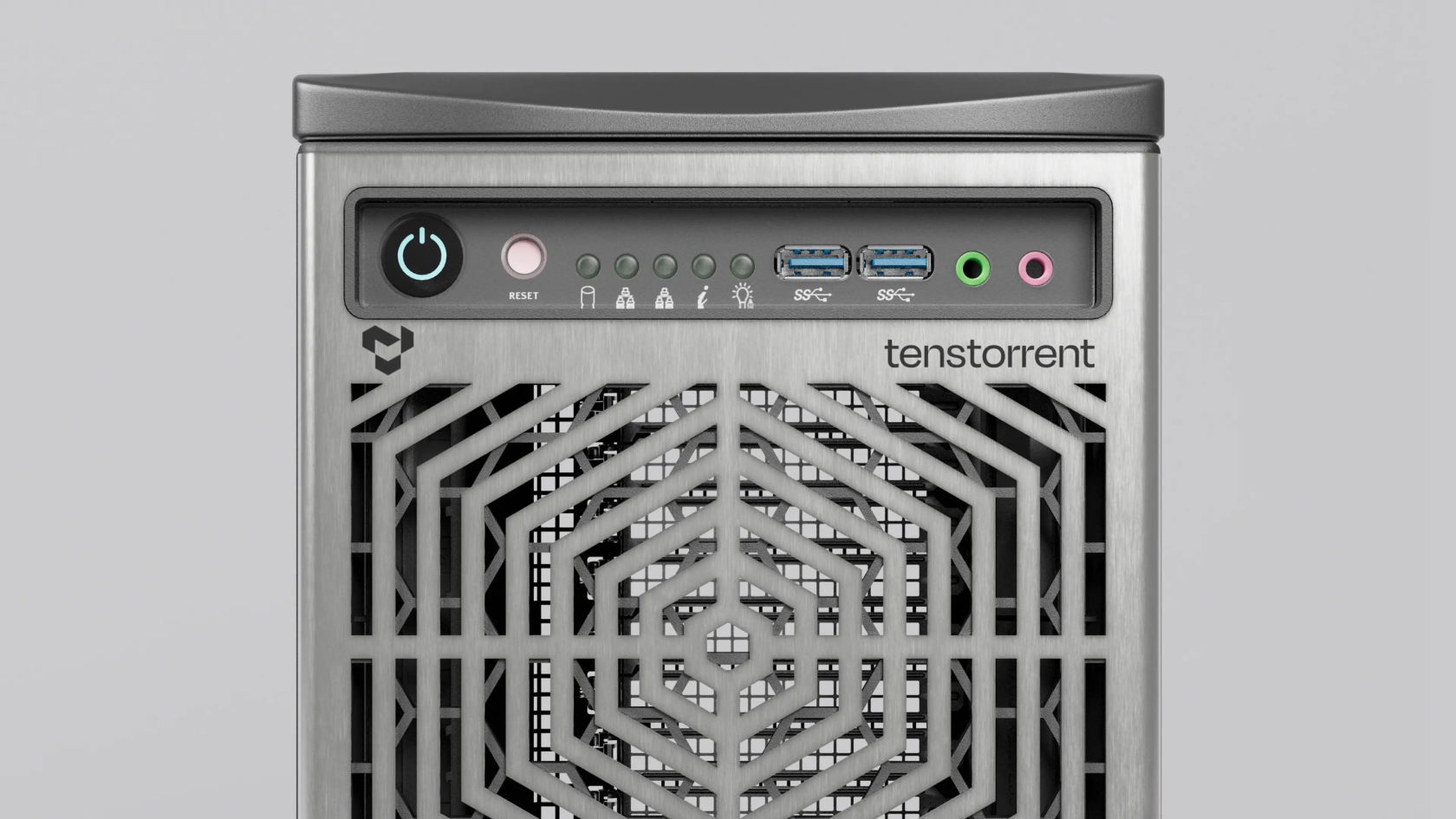
This document synthesizes the comprehensive hardware, software, and technical specifications of the **Tenstorrent TT-LoudBox™ (Wormhole)** AI workstation/server based on official product documentation.
---
## 1. Product Overview
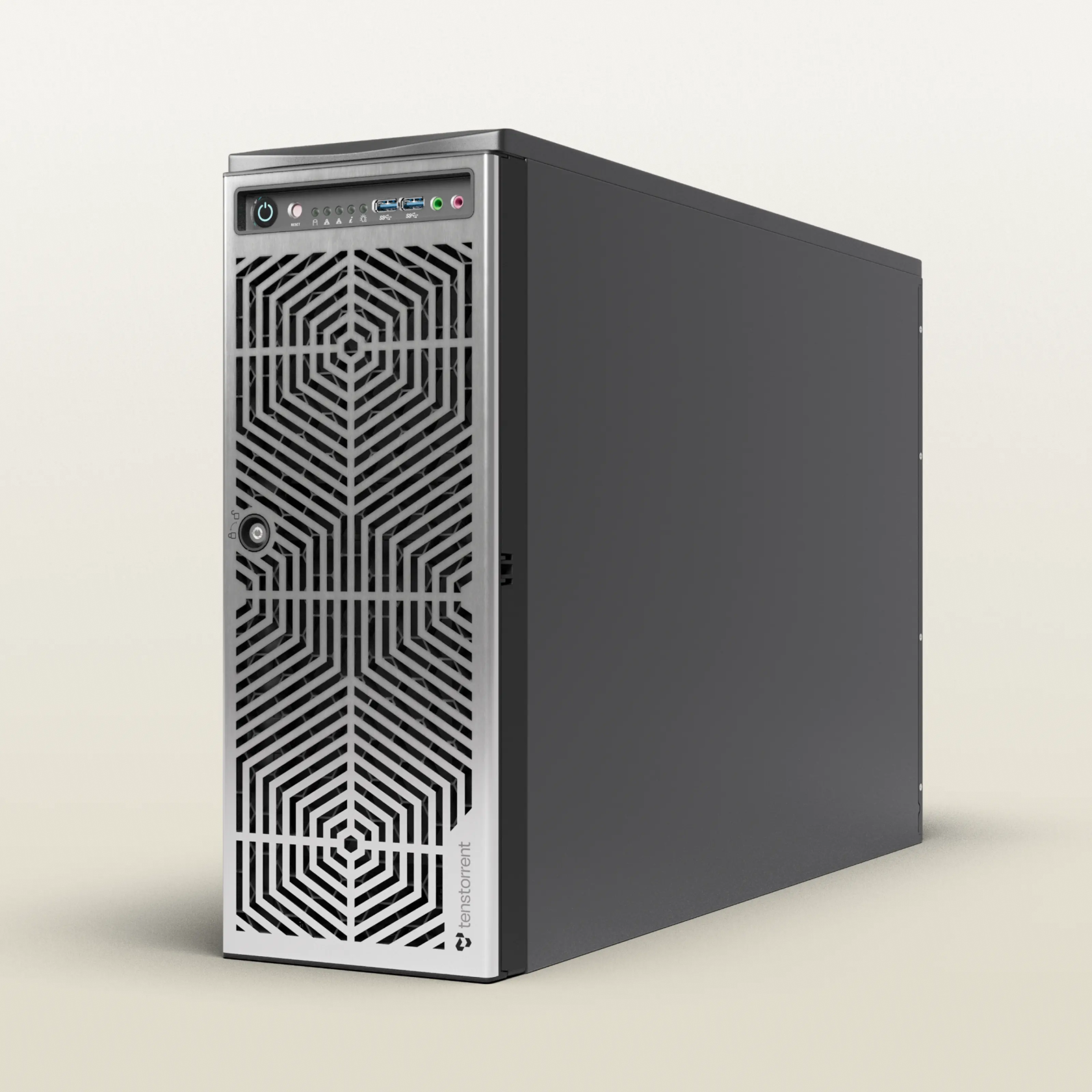
* **Product Name:** TT-LoudBox™ (Wormhole) – 4U Workstation / Rackmount Server (Internal code: T3000)[cite: 1].
* **Target Audience:** Designed for developers looking to run, test, and build AI models, or port and develop High-Performance Computing (HPC) libraries[cite: 1].
* **Starting Price:** From **$12,000 USD**[cite: 1].
* **Form Factor:** Air-cooled, versatile 4U chassis that can be deployed as a quiet office desktop workstation or mounted into a standard data center server rack[cite: 1].
[](https://wiki.chenjia.org/uploads/images/gallery/2026-05/PA2KzljIVfDnRIBb-image-1779622387819.png)
[](https://wiki.chenjia.org/uploads/images/gallery/2026-05/xZmTm9L1IVt63YAK-image-1779622675937.png)
---
## 2. AI Model Capacity
Utilizing a highly flexible Ethernet-based mesh topology, the TT-LoudBox scales and pools memory resources efficiently to handle large-scale models locally:
* **Single User / Single Model:** Capable of locally running models up to approximately **80 Billion parameters (80B)**[cite: 1].
* **Multiple Users / Multiple Models:** Supports concurrent users or multiple models running simultaneously with capacities up to approximately **20 Billion parameters (20B)**[cite: 1].
---
## 3. Technical Specifications
The system is available in two primary product configurations: **TW-02001** and **TW-02002**[cite: 1].
| Component | TT-LoudBox Configuration (TW-02001) | TT-LoudBox Configuration (TW-02002) |
| :--- | :--- | :--- |
| **Base System** | SuperMicro SuperServer SYS-740GP-TNRT[cite: 1] | SuperMicro SuperServer SYS-740GP-TNRT[cite: 1] |
| **Processor (CPU)** | 2x Intel® Xeon® Silver 4309Y (8 Cores/16 Threads per CPU, up to 2.8 GHz, 105W TDP)[cite: 1] | 2x Intel® Xeon® Silver 4309Y (8 Cores/16 Threads per CPU, up to 2.8 GHz, 105W TDP)[cite: 1] |
| **System Memory (Host RAM)** | 256GB (8x 32 GB) DDR4-3200 ECC RDIMM *(12 slots remaining open for upgrades)*[cite: 1] | 512GB (16x 32 GB) DDR4-3200 ECC RDIMM *(12 slots remaining open for upgrades)*[cite: 1] |
| **Storage** | 3.8 TB U.2 NVMe PCIe 4.0 x4[cite: 1] | 3.8 TB U.2 NVMe PCIe 4.0 x4[cite: 1] |
| **AI Accelerators (Tenstorrent ASICs)** | 4x Tenstorrent Wormhole™ n150 Tensix Processor Cards[cite: 1] | 4x Tenstorrent Wormhole™ n300s Tensix Processor Cards *(Dual-chip cards, totaling 8 Wormhole ASICs)*[cite: 1] |
| **Total Accelerator Memory** | 48GB GDDR6 / 96MB SRAM[cite: 1] | 96GB GDDR6 / 192MB SRAM[cite: 1] |
| **Included Cabling** | External QSFP-DD cables not included by default[cite: 1] | 2x QSFP-DD 400GbE Cables (0.6m / 2ft) & 4x Warp 100 Bridges[cite: 1] |
| **Host Connectivity** | • 2x RJ45 10GBase-T ports (Intel® X550-AT)
• 5x USB 3.1 Gen 1 Type-A (2 front, 3 rear)
• 1x USB 3.1 Gen 1 Type-C
• 1x COM, 1x VGA, 1x dedicated IPMI remote management port[cite: 1] | • 2x RJ45 10GBase-T ports (Intel® X550-AT)
• 5x USB 3.1 Gen 1 Type-A (2 front, 3 rear)
• 1x USB 3.1 Gen 1 Type-C
• 1x COM, 1x VGA, 1x dedicated IPMI remote management port[cite: 1] |
| **Processor Interconnect** | 8x Active 200G QSFP-DD ports (2 per card) forming an internal interconnect mesh[cite: 1] | 8x Active 200G QSFP-DD ports (2 per card) forming an internal interconnect mesh[cite: 1] |
| **Power Supply Unit (PSU)** | Redundant 1+1 Hot-swap Titanium Level power supplies:
• 1200W @ 100-127Vac
• 1800W - 2090W @ 200-240Vac
• 2220W @ 220-240Vac[cite: 1] | Redundant 1+1 Hot-swap Titanium Level power supplies:
• 1200W @ 100-127Vac
• 1800W - 2090W @ 200-240Vac
• 2220W @ 220-240Vac[cite: 1] |
| **Operating System** | Not pre-installed (Developers install preferred Linux distributions)[cite: 1] | Not pre-installed (Developers install preferred Linux distributions)[cite: 1] |
---
## 4. Software Stack & Open Source Ecosystem
Consistent with Tenstorrent's philosophy, the TT-LoudBox features a fully open-source software ecosystem optimizing two key developer entry points (SDKs):
1. **TT-Forge™ (High-level SDK):**
* An open-source, MLIR-based compiler framework[cite: 1].
* Currently in Public Beta[cite: 1].
* Tailored for model developers and application builders to compile and execute directly from native frameworks like **PyTorch, JAX, and ONNX** without micro-managing the underlying hardware architectures[cite: 1].
2. **TT-Metalium™ (Low-level SDK):**
* A bare-metal programming toolkit built for systems engineers and performance optimization specialists[cite: 1].
* Allows direct hardware orchestration and custom kernel development via the **TT-LLK** kernel library, unlocking the full potential of computing grids for specialized math operations[cite: 1].
---
## 5. Package Contents
Each TT-LoudBox (Wormhole) shipment includes the following components:
* 1x Tenstorrent TT-LoudBox (Wormhole) 4U System[cite: 1].
* 1x C13 Power Cord (1.8m / 6ft)[cite: 1].
* 1x 4U Rack-Mounting Rail Kit[cite: 1].
* 2x QSFP-DD 400GbE Cables, 0.6m (Included *only* with the **TW-02002** SKU)[cite: 1].
---
*Reference: Tenstorrent Hardware Products & Systems Documentation (Updated 2026).*[cite: 1]
# 🐙 Multi-Token Prediction (MTP): The Price of Breakthrough, The Value of Certainty
In the competitive landscape of Large Language Models (LLMs), **Multi-Token Prediction (MTP)** has emerged as one of the most radical departures from traditional autoregressive architectures. Traditionally, LLMs are trained on a Next-Token Prediction (NTP) paradigm—predicting exactly one token at a time given a historical context. MTP shifts this boundary by forcing the network to predict multiple future tokens simultaneously through parallel independent or sequential auxiliary heads.
At first glance, MTP introduces a harsh paradox: **it requires significantly more computational resources, memory overhead, and training complexity.** Yet, AI researchers and top-tier labs increasingly view MTP not as an engineering burden, but as a critical *cứu cánh*—a vital lifeline for the next generation of cognitive systems.
Here is why MTP is fundamentally worth its steep resource price tag.
---
### 1. Shattering the Autoregressive "Myopia"
The core limitation of standard Next-Token Prediction is its structural shortsightedness. Because the model only optimizes for the immediate next token, it frequently slips into local optima or "greedy" linguistic patterns.
MTP forces the hidden representations at the core of the model to look ahead. To successfully predict token $t+1$, $t+2$, and $t+3$ all at once, the shared latent space must construct a coherent macro-plan of the entire sentence or algorithmic step. This architectural shift addresses several profound bottlenecks:
* **Long-Term Planning:** The model develops an internal representation of where the clause or code block is heading, rather than drifting aimlessly token by token.
* **Mitigating Exposure Bias:** Autoregressive models suffer from compounding errors—a single bad token early in a generation skews all subsequent context. By optimizing for a future window, MTP explicitly trains the model to be robust against immediate-next-step deviations.
### 2. A Paradigm Shift for Code Generation and Logic
While MTP improves standard prose, it acts as an absolute lifeline for formal reasoning tasks, particularly **Code Generation**.
In programming, a single logical thought translates to a rigid multi-token syntax (e.g., initializing a loop syntax `for i in range():`). An NTP model expends valuable cognitive capacity ensuring each character and colon is syntactically correct step-by-step. MTP allows the model to treat these standard syntactic chunks as unified, multi-token trajectories.
* It drastically reduces syntax-level mistakes.
* It frees up the deeper layers of the transformer to focus on high-level algorithmic logic rather than mundane token transitions.
### 3. Unlocking Massive Speculative Decoding Efficiency at Inference
While MTP demands higher compute and VRAM during the *training* phase (due to maintaining multiple prediction heads and processing larger gradient paths), it pays massive dividends during *inference* via **Speculative Decoding**.
In standard speculative decoding, a smaller "draft" model guesses a few tokens, and the large "target" model validates them in a single forward pass. This requires keeping two separate models in memory and managing their synchronization.
With MTP, the model acts as its own draft model. The auxiliary heads generate a stream of future candidate tokens for free, which the main trunk can validate in parallel within a single forward pass. This eliminates the need for an external draft model, slashes memory bandwidth bottlenecks, and can speed up inference throughput by **1.5x to 3x** without sacrificing accuracy.
---
### Summary: Trading Compute for Competence
| Metric | Next-Token Prediction (NTP) | Multi-Token Prediction (MTP) |
| :--- | :--- | :--- |
| **Compute Overhead** | Baseline ($1\times$) | Higher ($1.2\times - 1.5\times$ during training) |
| **Memory Footprint** | Optimized | Increased (Multiple prediction heads) |
| **Cognitive Horizon** | Short-sighted (Immediate next token) | Long-sighted (Global context & future planning) |
| **Inference Speed** | Bound by sequential memory bandwidth | Highly accelerated via native speculative decoding |
Ultimately, computational power can be scaled through hardware optimization, cluster scaling, and specialized silicon. **Cognitive capability, planning horizons, and structural logic, however, cannot be solved by simply throwing raw data at an outdated NTP architecture.** Multi-Token Prediction is a vital lifeline because it converts raw, brute-force computational scale into something far more valuable: genuine architectural foresight and logical stability.
# 🐙 Google Turboquant + llama.cpp
#### 🐲 Helloworld
Google public **Turboquant**, which is KV-Cache smaller and fast enought.
It reduce 16 bit data into 3-4bit only and frees up to 83% of the memory typically consumed by long prompts.
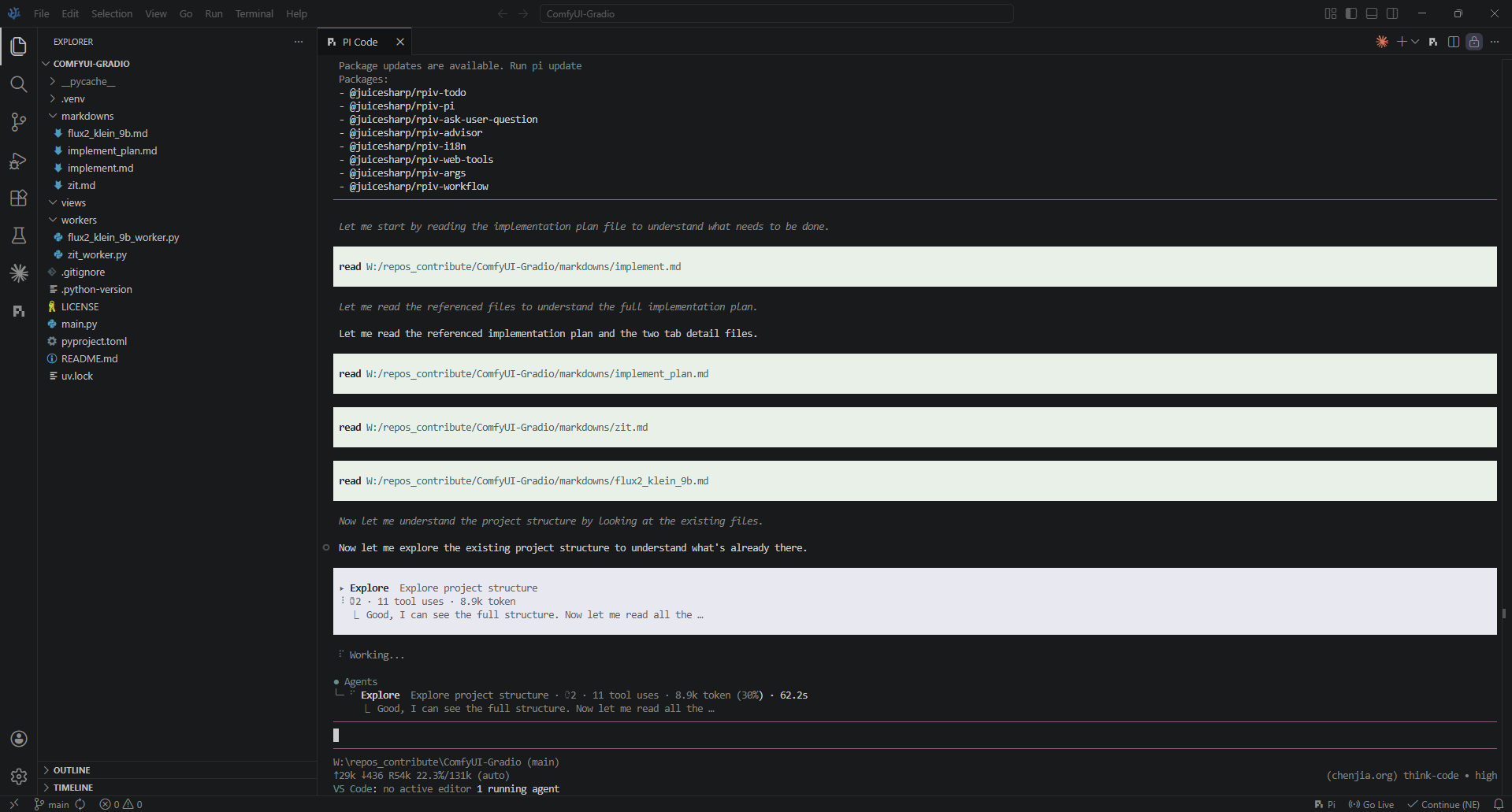
I self-build this fork [llama-cpp-turboquant](https://github.com/TheTom/llama-cpp-turboquant) and have a first try.
**docker-compose.yaml**
```yaml
services:
llama-cpp:
image: llama-cpp:turboquant
container_name: llama-cpp
ports:
- 8080:8080
privileged: true
ipc: host
volumes:
- /mnt/data/files/models:/app/models
command: >
-m /app/models/unsloth/Qwen3.6-35B-A3B-MTP-GGUF/Qwen3.6-35B-A3B-UD-IQ4_NL.gguf
--port 8080 --host 0.0.0.0
-t 12 -c 262144
--parallel 1 --no-context-shift --no-mmap --jinja
-b 4096 -ub 4096
-ngl 999 --cpu-moe
-ctk turbo3 -ctv turbo2
--spec-type draft-mtp --spec-draft-n-max 3
--kv-unified --cache-ram 0
deploy:
resources:
reservations:
devices:
- driver: nvidia
count: all
capabilities:
- gpu
restart: unless-stopped
```
[](https://wiki.chenjia.org/uploads/images/gallery/2026-05/QbLIXabiVXZcdOfC-image-1779971012257.png)
---
#### 🐲 Result
| | **Original** | **TurboQuant** |
| --- | --- | ------- |
| **token/s** | 29 | 32 |
| **RAM** | 26 GB | 20 GB |
| **vRAM** | 11 GB | 10 GB |
Speed loose **~10%**, but RAM consumption lower.
---
#### 🐲 Precision
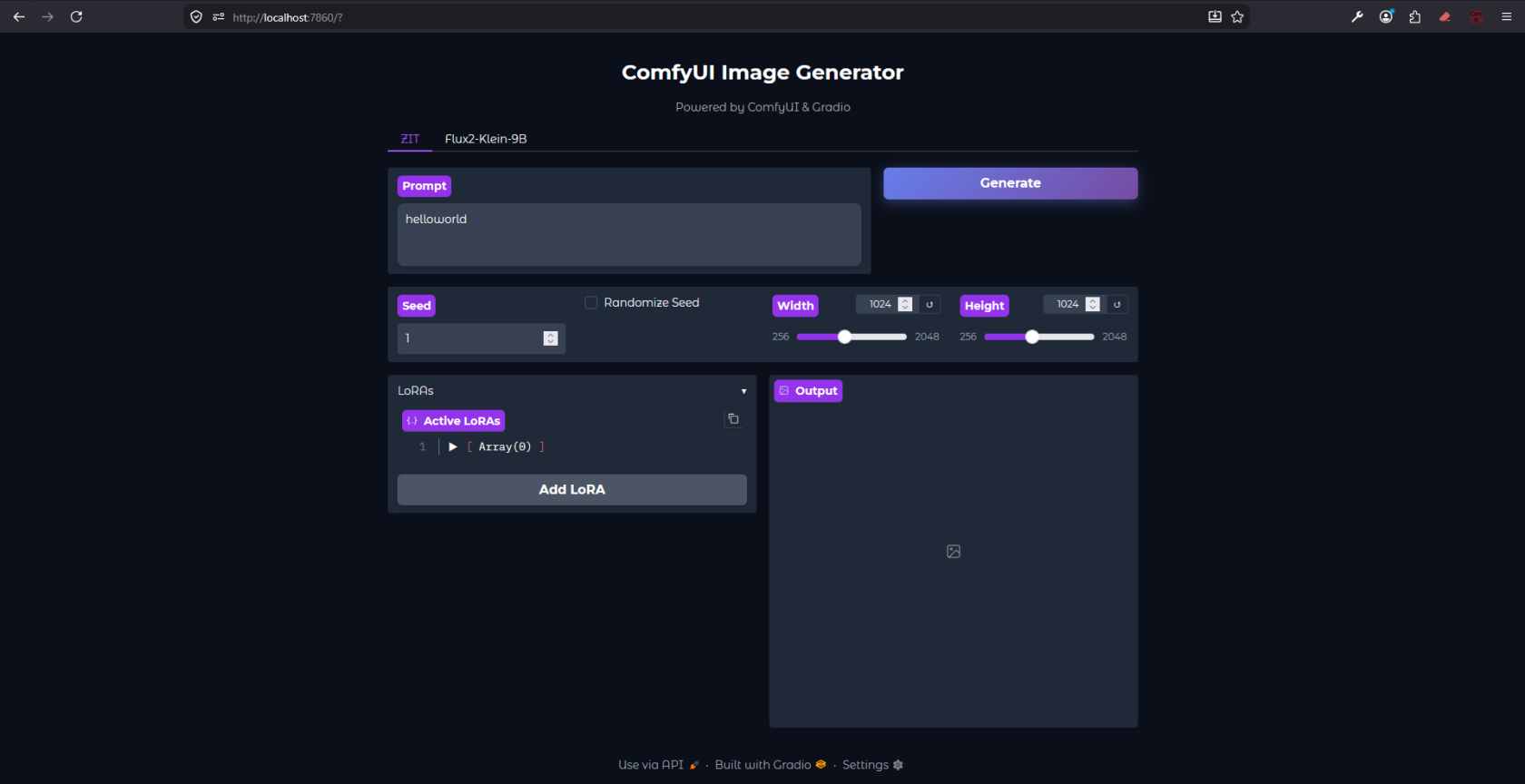
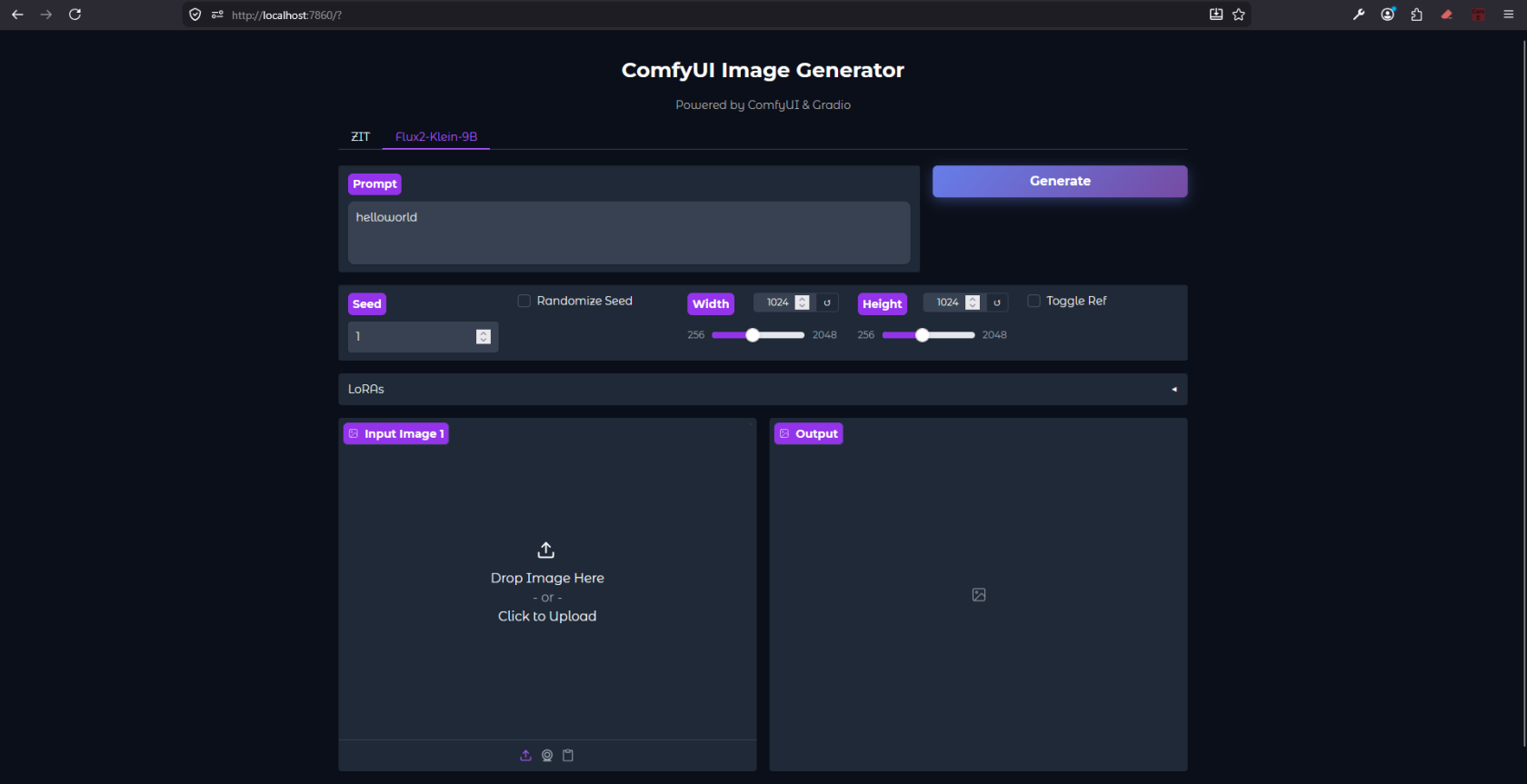
Ok, now we known Turboquant help memory usage lower.
But how about precision ?
> The result is good, better UI/UX than Qwen Coder web.
[](https://wiki.chenjia.org/uploads/images/gallery/2026-05/V3yEAOFbwiSiMF6y-image-1779975041596.png)
[](https://wiki.chenjia.org/uploads/images/gallery/2026-05/AGtolevU4Thkj6AG-image-1779975173306.png)